Posted on 02/25/2026 6:24:59 PM PST by hole_n_one
I was hoping that this would resolve itself but it has not…..
Yesterday, a post was put up on FR and I wanted to see more than just the provided excerpt, so I clicked on the source link.
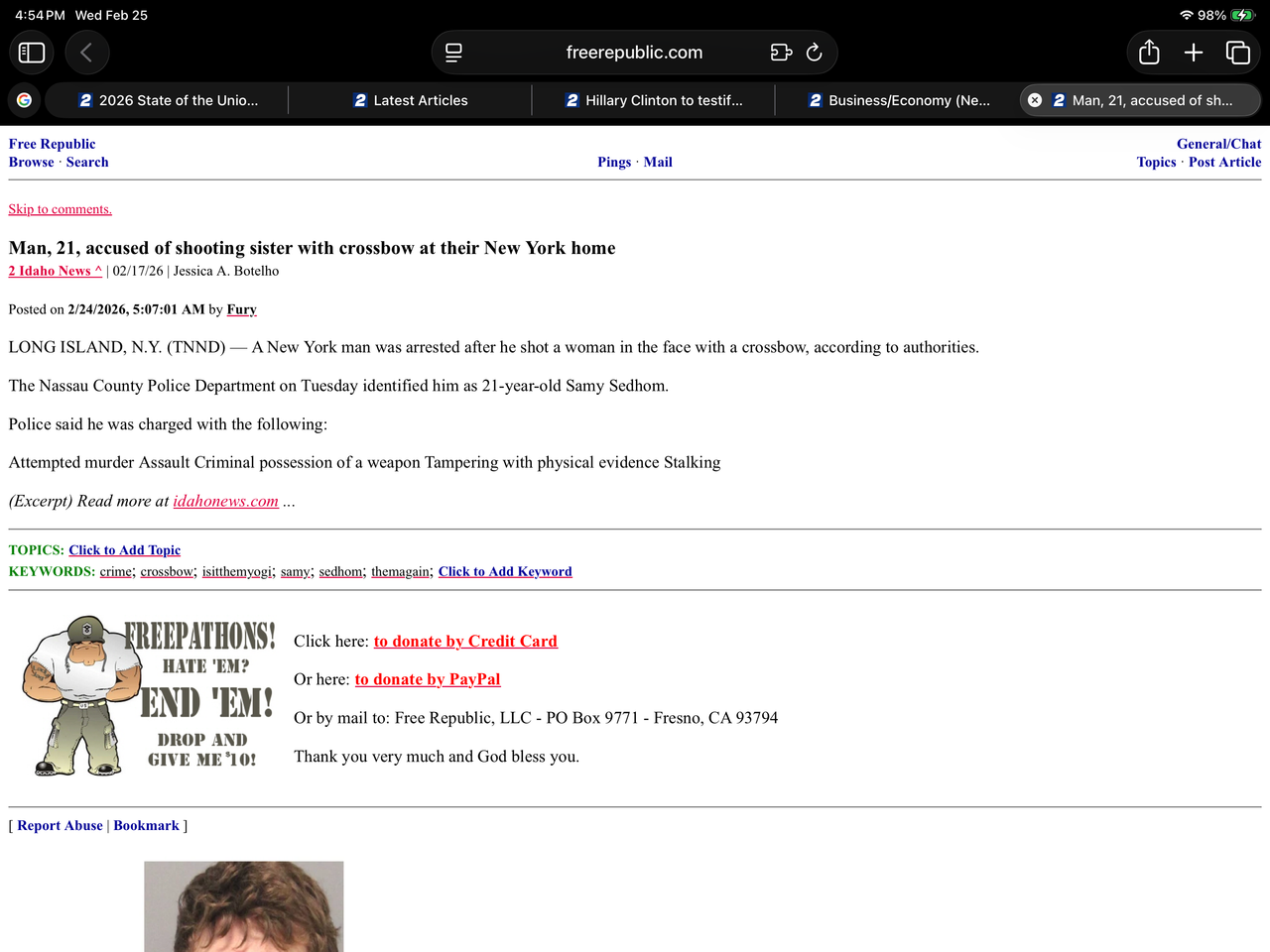
Ever since I did that, every tab that gets opened on my iPad (Safari browser) to an FR forum or page/post, the new tab has the number 2 in white with a blue background preceding the FR forum name or article title.
The number font and coloring is identical to the news station’s (2 Idaho News) logo that was used as the source link.
Here is a pic of what I am encountering…..
It’s your Beeber, tune it non-stuned.
You’re welcome.
On the other hand, it looks like the “2” actually is the station’s icon. Most of my Firefox tabs have tiny icons at the left of the tab, including even FR’s.
And when I click on your “source link”, I also see a “2” icon in my Firefox browser tab!
Exactly, because it’s their favicon (I just learned that term today…thanks Drago!) on their website.
For some weird reason, I’m getting their favicon on FR’s pages instead of FR’s white star with the blue/red background favicon.
History of “Favicons”: https://en.wikipedia.org/wiki/Favicon
More things to try to “clear” the “Channel 2-TV” Favicon off FR tabs:
https://ithy.com/article/favicon-cache-reset-0vwnkrre
I’m on my iPad this evening with Safari and I show FR favicons beside FR tabs. I’m not about to check on your link to see if I get a “2” icon beside FR tabs. Instead, I’ll follow the thread to see if FR favicons are restored on powerset’s screen.
I will try some of the suggested remedies tomorrow and update this thread with the results.
Thanks for all your help and assistance!
That’s why I really despise apple products - it doesn’t allow the tweaking you can do in Linux.
It appears your iPad’s Safari browser is displaying the favicon (the small icon associated with a website) from the 2 Idaho News website instead of the standard Free Republic icon.
the browser’s cache got “confused” after you navigated from one link to another. Because you clicked the 2 Idaho News link directly from the Free Republic page, Safari has incorrectly mapped that news station’s “2” logo to the Free Republic domain in its local memory.
To fix it you gotta do the standard “have you tried turning it off and on again :) “
So:
1. Close all open tabs that lead to Free Republic or 2 Idaho News.
2. Open your iPad Settings -> scroll down and tap on Safari.
Scroll to the bottom and tap Advanced—> Website Data.
3. Search for “freerepublic.com” and “idahonews.com.”
4. Swipe left on those entries and tap Delete — I’d prefer to “Remove All Website Data” at the bottom but that would remove your logins to other pages.
Im not logged in.
What did you say?
My sister… seriesly.
Probably an anomaly in the browser.
Hm, that might explain why I couldn't open my text messages while I was talking on the iPhone since they recently updated the iPhones. An account holder texted me a verification code before they would disclose my account info but I couldn't get iMessage to open. Had to get off the call to look at it and wait for the customer rep to call me back. PITA.
It might help to call Apple Customer Service, since others (post 25 and post 50) are having weird issues since the update.
I tried multiple approaches and suggestions as provided in your links and instructions without success.
If this is the worst that I will encounter using Safari as my browser, I will simply leave it as is and hope that more quirks don’t begin and perhaps the next IOS update will resolve it.
Thanks again for all your help.
I am wondering if you somehow “pinned” the tabs? I have a couple pinned at the top of my browser because I reference them throughout the day.
Put your finger on the tab and hold it. A selection will come up and it might say something like “pin” or “unpin.” You want to “Unpin” it.
You might have gotten a virus…but that is odd for an iPad.
From everything I have read, this favicon cache issue with Safari that I am experiencing is not an isolated incident.
It seems to be an ongoing issue and not yet resolved.
Thanks for your input!
Did you try calling Apple? Don’t pose it as a question, or they might charge you for advice, but pose it as a complaint about the update. They will probably help you.
“I’ll follow the thread to see if FR favicons are restored on powerset’s screen”
Yes, when I go “Back” from “source link”, the FR favicon is restored. Furthermore, the other FR tabs’ favicons did not change when going to or from the “source link”. I.e., it all behaved correctly.
Just happened to me when I clicked on the Breaking News thread on Kristi Noem’s firing as DHS secretary. There is an iPad update tonight and I’ll see if that helps to resolve it.
Disclaimer: Opinions posted on Free Republic are those of the individual posters and do not necessarily represent the opinion of Free Republic or its management. All materials posted herein are protected by copyright law and the exemption for fair use of copyrighted works.