Posted on 02/25/2026 6:24:59 PM PST by hole_n_one
I was hoping that this would resolve itself but it has not…..
Yesterday, a post was put up on FR and I wanted to see more than just the provided excerpt, so I clicked on the source link.
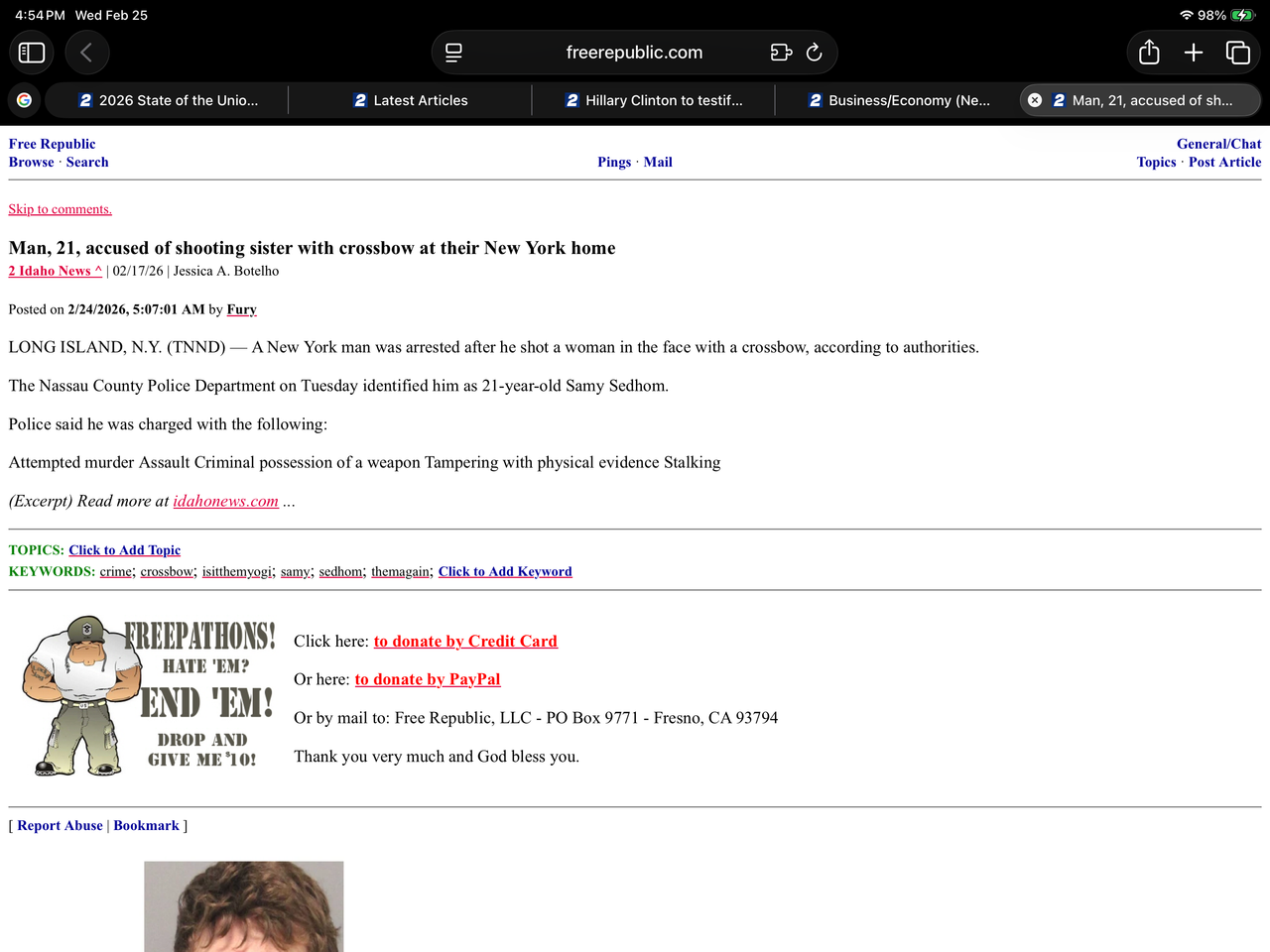
Ever since I did that, every tab that gets opened on my iPad (Safari browser) to an FR forum or page/post, the new tab has the number 2 in white with a blue background preceding the FR forum name or article title.
The number font and coloring is identical to the news station’s (2 Idaho News) logo that was used as the source link.
Here is a pic of what I am encountering…..
No luck.
Good thought!

Do you use the https://www.freerepublic.com ?
I haven’t had any issues. I used to use the http: but a friend said always go the more secure route
Try updating Safari
There are bugs with MacOS (I am on Tahoe) and the newest version of Safari.
I upgraded my 2017 Mac Pro to a 2026 Mac Studio Pro, and it was the most difficult transition I have ever gone through. I have been using Macs since 1986, though I also used Unix and Windows in all of its variations, but my home computer is a Mac. Making that transition, it took me nearly two weeks and at least eight tries at using the Migration Assistant, each effort taking 8-16 hours.
I did not appreciate that experience, as you can guess.
The system is working fine now, but with Safari, I am having ongoing issues. The main issue is that the browser becomes unresponsive, and the only thing that gets it working again is clearing the cache and browser history. I don’t really understand what the issue is, but I am having issues.
My point in this: I think the quality control of the MacOS and associated Apple software (such as Safari) seems very different to me. It feels different.
I am having issues where I have to right click to rename a file, instead of clicking on the file name directly to edit it. Drag and drop of text (which I depend greatly on) is very spotty for me, particularly in Safari.
It just doesn’t feel right.
And I think it is OS/Application issue, not the web page itself, because I am seeing these issues on my iPhone, iPad, laptop, and desktop Mac.
Like you, I have also noticed that the browser windows exhibit what appears to be unusual behavior with respect to the a given web page where it loads with what appears to be a different scheme or color layout.
I don’t know what your issue is (I don’t have that same issue you do) but I think there are unexplained bugs out there with Safari. I can’t provide advice, but it might be helpful to you to know others might be seeing issues.
🎶“It’s BIG! It’s HEAVY! It’s WOOD!”🎶
Thanks for your suggestion!
Brave. Best!
Maybe the thread’s OP put a whammy on the link 😳
Those are called “Favicons” and they get messed up sometimes...”Duck Duck Go” AI has this say (and I tend to agree):
“To fix a stuck favicon in Safari on your iPad, try clearing the website data in Safari settings. If that doesn’t work, you can set the date on your iPad to a future date, clear the website data again, and then return the date to normal to refresh the favicon cache.
Common Issues with Favicons in Safari on iPad
Favicons in Safari on iPad can sometimes display incorrectly, showing the wrong icons for websites. This issue is not uncommon and can be caused by caching problems or bugs in the browser.
Reasons for Stuck Favicons
Caching Issues: Safari may cache favicons, leading to outdated or incorrect icons being displayed.
Browser Bugs: Certain versions of iPadOS have known bugs that affect how favicons are rendered.
Solutions to Fix Stuck Favicons
Clear Safari Cache
Open Settings on your iPad.
Scroll down and select Safari.
Tap on Clear History and Website Data.
Confirm the action.
Manually Refresh Favicons
If clearing the cache does not work, you can try this method:
Set the date on your iPad to a month in the future.
Go to Safari Settings and clear the website data for the affected site.
Visit the site again to see if the correct favicon appears.
Reset the date back to the current time.
Delete Favicon Cache
For persistent issues, you can delete the favicon cache:
Use a file management app to access the Safari cache.
Navigate to the Favicon Cache folder.
Delete the contents of this folder.
Restart Safari to rebuild the cache.
Additional Tips
Ensure that the favicon is in a supported format (PNG or JPG) as Safari does not support SVG favicons.
If the problem persists, consider using a different browser temporarily until the issue is resolved in Safari.”
This sounds both hugh and series. Could it be Thailand????
I tried #2…
Set the date on your iPad to a month in the future.
Go to Safari Settings and clear the website data for the affected site.
Visit the site again to see if the correct favicon appears.
Reset the date back to the current time.
No luck.
Thanks!
How did I miss that!
C’mon man!
I never use Safari. I have a mac, ipad, iphone, etc. Brave or Firefox. Good luck with Safari
I’m on a 10 year old iPad, with Safari. I am not having any problems. I clear the cache every couple of days and reboot. Have you downloaded any apps recently, about the time you started having problems? Just a thought.
It is definitely unique to Safari as Chrome does not exhibit this behavior on the same iPad device.
Since there was an IOS update that pretty much coincided with when this oddity began, I am going to just sit tight and see if the next update resolves it.
Thanks for your input!
Thanks for taking the time to relay your experiences.
Yes. I hate that as a solution, but that is a rational option. Good luck.
I don’t use Safari or iPad (I use Linux), so I did a DDG-search for: “what does the little numeral added at the left of a Safari tab on iPad mean”
It came up with too many results to post, but I skimmed a few. One thing I came across was “Tab Groups”. Could the “2” mean that a Tab Group #2 was created which now contains these tabs?
I don’t think so.
The number 2 is identical to the icon used by the news station website that was used as a source for the post I referenced.
Reply #30 explains what it is, the history of issues surrounding it and the options to potentially correct this oddity, but the two I have tried were not successful.
Thanks for taking a crack at it!
Disclaimer: Opinions posted on Free Republic are those of the individual posters and do not necessarily represent the opinion of Free Republic or its management. All materials posted herein are protected by copyright law and the exemption for fair use of copyrighted works.