Posted on 04/08/2016 10:01:01 AM PDT by Swordmaker
Adobe-FlashAdobe has issued Flash Player security updates for OS X, Windows, Linux, and Chrome OS to address "critical vulnerabilities that could potentially allow an attacker to take control of the affected system" by way of ransomware.
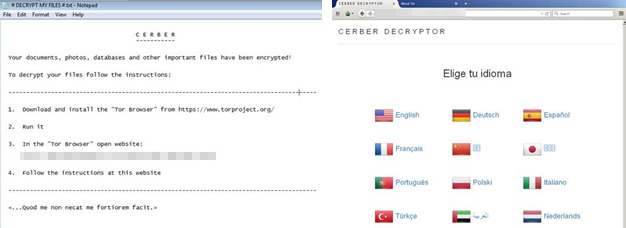
Ransomware is a type of malware that encrypts a user's hard drive and demands payment in order to decrypt it. These type of threats often display images or use voice-over techniques containing instructions on how to pay the ransom.
In this particular "CERBER" attack (via Reuters), affecting Flash-based advertisements, attackers have reportedly demanded between around $500 and $1,000, to retrieve the encrypted files. Adobe says it is aware of Windows 10 being "actively exploited" by this attack, but it is unclear if any Macs have actually been victimized. Just last month, popular BitTorrent client Transmission was temporarily infected with the first ransomware found on the Mac platform.
Currently, all servers hosting these malvertisements are now inaccessible. Some reports mentioned that CERBER is being peddled in the Russian underground market as ransomware-as-service (RaaS). This not only proves the suggestion presented by the configuration file’s code above, but also confirms that we will be seeing more of CERBER in the near future.
Adobe recommends that Flash Player users on Mac update to version 21.0.0.213 through the update mechanism within the software when prompted, or by visiting the Adobe Flash Player Download Center. Adobe Flash Player installations within Chrome, Microsoft Edge, and Internet Explorer for Windows 8.1 or later should be automatically updated with the latest version of each browser. This is the second critical Flash Player security update for OS X and other platforms in the span of one month.
Not sure if this is related but Century Link here in Phoenix has been so bad this week. Web pages will not load properly and the internet is super slow. My sister who resides in another states says they are experiencing the same thing.
Century Link, when asked about this, says there are no issues and they attempt to sell you more products.
My computer is up to date with all updates, AV protection and Malware Bytes running.
Thanks for the link. Says I have version 21,0,0,213 installed
21.0.0.213 is the latest on both Windows and OSX.
I think it is probably because it is one of the last extant examples of Christmas Tree programing. . . Adobe kept adding functions to it as it "jest growed" over the years there are too many "darned" patches everywhere in its code where hackers can find flaws to hook in malware. It should have been completely rebuilt from the ground up with new code years ago with a sensible framework instead of being repeatedly patched.
By Peter Cohen

Word has emerged about a “ransomware” exploit involving Adobe Flash. Adobe has responded with an update. The ransomware exploit is, for now, limited to users of Windows, but the update has been made to all supported platforms, so it’s an update to essential Flash code, not just something Windows-ish.
This illustrates that you need to be very careful about what you keep on your computer, and that you may want to periodically rethink the software you have installed.
To that end, if you absolutely need Adobe Flash to access content on the web that you need, at least make sure you’ve updated to the most recent version. Following another heinous Flash problem last March, I posted details about to update Flash safely on your Mac.
Those some rules apply today if you need to update. But if you don’t need Flash, you’ll be better off without it all together. It’s a gaping security problem, can cause performance and battery drain issues and is increasingly irrelevant to the web as more developers use HTML5 and other media-rich non-proprietary tech.
So why not remove it all together? If you already have Flash installed on your Mac and you’ve decided that enough is enough, here’s how to get rid of it once and for all.


Once it’s done, and you quit, the removal app should disappear all together.
If you ever want to reinstall Adobe Flash Player, simply visit Adobe’s web site and download the installer.
Also, bear in mind that it’s perfectly fine to have a Mac that doesn’t have Flash installed but still access Flash content. The trick is to use Google’s Chrome browser. Chrome “sandboxes” Flash inside itself, so you can still see Flash content on the web without it possibly affecting the rest of your computer.
Thanks Swordmaster, I removed Flash the last time you told us how but subsequently reinstalled it to view something. Time to uninstall again!
I don't think it has anything to do with the developers. It has to do with the people paying the bills. It costs money to convert systems and content. I got rid of Java a few years ago and haven't missed it. Flash is a different story since media content is provided via flash. Being a tech savvy person I'd like to think I can deal with it. My aging parents can't..
Thanks to Swordmaker for the ping!!
Not so I believe. Mine is 21.0.0.213 dated Friday, April 8. Firefox automatically updated it as I don't recall doing anything to initiate that update (In general, Firefox on my Win7 machine will notify me of updates, but will not install until I o.k.).
BTW, that link of yours shows the newer version having a LOWER version number than mine (0.182 vs. 0.213). I've never seen that being the case before.
Disclaimer: Opinions posted on Free Republic are those of the individual posters and do not necessarily represent the opinion of Free Republic or its management. All materials posted herein are protected by copyright law and the exemption for fair use of copyrighted works.