Free Republic
Browse · Search
General/Chat
Topics · Post Article

Skip to comments.

Why is everything so tiny and what do I need to do?

Posted on 07/14/2026 6:44:34 AM PDT by kelly4c

I haven't been here in a long time because something changed with the front resolution or whatever and now it's super tiny and even though I have my settings on maximum font and display there is no way to comfortably browse this site anymore but I miss it so I'm reaching out to find out if anything can be done.


TOPICS: Miscellaneous
KEYWORDS: vanity

Click here: to donate by Credit Card

Or here: to donate by PayPal

Or by mail to: Free Republic, LLC - PO Box 9771 - Fresno, CA 93794

Thank you very much and God bless you.


Navigation: use the links below to view more comments.
first previous 1-2021-4041-45 next last
To: spacejunkie2001; kelly4c; Melinda in TN

Use the Opera browser - best browser to read FR. (and other sites as well). It reflows text and you can easily zoom up and down to any size by simply double tapping the screen and dragging up and down.


21 posted on 07/14/2026 7:20:58 AM PDT by aquila48 (Do not let them make you "care" ! Guilting you is how they control you. )
[ Post Reply | Private Reply | To 6 | View Replies]

To: kelly4c

If you are browsing on an Android smart phone:

To change the text size on your phone, navigate to your device’s Accessibility or Display settings.

This adjustment instantly resizes text across your home screen, system menus, and supported applications.

How to Change Text Size on Android

Steps vary slightly by manufacturer, but the core path remains consistent across devices like Samsung Galaxy and Google Pixel:

1. Open your phone’s Settings app.

2. Scroll down and tap Accessibility (or Display on some models).

3. Tap Vision enhancements or directly look for Font size and style / Display size and text.

4. Use the slider at the bottom of the screen to scale the text larger or smaller


22 posted on 07/14/2026 7:23:25 AM PDT by Anti-Bubba182 ("Either we fight back or they will kill us" Elon Musk)
[ Post Reply | Private Reply | To 1 | View Replies]

To: ShadowAce; dayglored; martin_fierro
Time to admit that using Lilliput as your tax haven was a bad idea.

23 posted on 07/14/2026 7:25:00 AM PDT by SunkenCiv (The Demagogic Party is just a collection of violent, rival street gangs.)
[ Post Reply | Private Reply | View Replies]

To: kelly4c

My system has a little “...” you can click on to bring up numerous options. One of them is to change the text size.


24 posted on 07/14/2026 7:33:29 AM PDT by libertylover (The HBM (Has Been Media) is almost all AGENDA-DRIVEN and HATE-DRIVEN, not-truth driven)
[ Post Reply | Private Reply | To 1 | View Replies]

To: kelly4c

on my phone i had to switch from Brave to Firefox to go back to normal sized text.


25 posted on 07/14/2026 7:35:19 AM PDT by mowowie
[ Post Reply | Private Reply | To 1 | View Replies]

To: kelly4c

“Go ask Alice
When she’s ten feet tall!”


26 posted on 07/14/2026 7:35:21 AM PDT by Uncle Miltie (When your Supreme Leader is easily whacked by Jews, reconsider how Akhbar your Allah is!)
[ Post Reply | Private Reply | To 1 | View Replies]

To: mikesmad

Worked on every site except fr


27 posted on 07/14/2026 7:37:07 AM PDT by spacejunkie2001
[ Post Reply | Private Reply | To 15 | View Replies]

To: Magnum44

Cant stand that dude should have stuck with just being a doctor


28 posted on 07/14/2026 7:39:23 AM PDT by al baby (i know )
[ Post Reply | Private Reply | To 19 | View Replies]

To: spacejunkie2001

OK open Freerepublic and do the same thing for it..your zoom may be much larger for it but that will apply to the one web site you are on I think. I had this same issue months ago after an update and I think that is what I had to do.


29 posted on 07/14/2026 7:43:24 AM PDT by mikesmad
[ Post Reply | Private Reply | To 27 | View Replies]

To: kelly4c

Are you signed in?


30 posted on 07/14/2026 7:44:55 AM PDT by faucetman (Just the facts, ma'am, Just the facts )
[ Post Reply | Private Reply | To 1 | View Replies]

To: kelly4c

bttt


31 posted on 07/14/2026 7:45:39 AM PDT by BenLurkin (The above is not a statement of fact. It is opinion or satire. Or both.)
[ Post Reply | Private Reply | To 1 | View Replies]

To: Anti-Bubba182

“”A tip in FR Mail: “Press Ctrl + should make the type as large as you want.”

That’s what I was going to say - I’m on desktop ONLY so that’s how I enlarge or decrease size of font....CTRL and move mouse up/down to accomplish it...


32 posted on 07/14/2026 7:49:58 AM PDT by Thank You Rush
[ Post Reply | Private Reply | To 12 | View Replies]

To: kelly4c

My gripe is the light gray background with a bit darker printi. Nearly impossible for these old eyes to reckon with.


33 posted on 07/14/2026 7:52:55 AM PDT by Donbue
[ Post Reply | Private Reply | To 1 | View Replies]

To: spacejunkie2001

Same here. I have to zoom in on everything now.


34 posted on 07/14/2026 7:59:55 AM PDT by Mathews (I have faith Malachi is right!!! Any day now...)
[ Post Reply | Private Reply | To 6 | View Replies]

To: kelly4c
I just flip my Iphone from vertical (portrait) to horizontal (landscape) and the text is larger and more readable.

On my Macbook I use a two finger tap on the touchpad and it zooms the text out to fill the screen.

Would think that would be similar for other platforms.

35 posted on 07/14/2026 8:05:43 AM PDT by P8riot (You will never know Jesus Christ as a reality in your life until you know Him as a necessity.)
[ Post Reply | Private Reply | To 1 | View Replies]

To: mikesmad

Thanks. It doesn’t work. It still increases the font on every other site but not FR.


36 posted on 07/14/2026 9:11:15 AM PDT by spacejunkie2001
[ Post Reply | Private Reply | To 29 | View Replies]

To: spacejunkie2001

One last try. Open freerepublic page then go to the three dots, settings, accessibility, then turn on Show Zoom Option in main menu. Then go back out to freerepublic, click the three dots again, you should have zoom option in the menu now, drag that over until the font is bigger. That should only affect freerepublic and not your other sites.


37 posted on 07/14/2026 9:31:59 AM PDT by mikesmad
[ Post Reply | Private Reply | To 36 | View Replies]

To: kelly4c; All
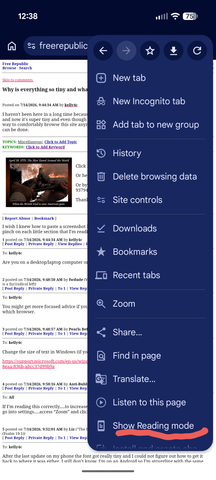
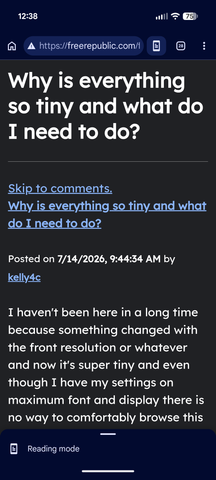
Without permanently changing your mobile Chrome setting via Accessibility, you can do choose "Show Reading Mode" on the pages for whch the text is too small. Then you can pinch or shrink the font size with your fingers and the text will wrap perfectly:

RESULT:


38 posted on 07/14/2026 9:44:10 AM PDT by montag813
[ Post Reply | Private Reply | To 1 | View Replies]

To: kelly4c

i have the same problem on my phone only. it sucks and i can”t fix it.


39 posted on 07/14/2026 10:03:25 AM PDT by subterfuge (What happened to my tagline?)
[ Post Reply | Private Reply | To 1 | View Replies]

To: kelly4c
You are not a real person, you are just an AI projection......

Try....

<"font size="...">

Delete the first (").

🤖🤖🤖 beep beep

40 posted on 07/14/2026 10:04:58 AM PDT by BFW
[ Post Reply | Private Reply | To 1 | View Replies]


Navigation: use the links below to view more comments.
first previous 1-2021-4041-45 next last

Disclaimer: Opinions posted on Free Republic are those of the individual posters and do not necessarily represent the opinion of Free Republic or its management. All materials posted herein are protected by copyright law and the exemption for fair use of copyrighted works.

Free Republic
Browse · Search
General/Chat
Topics · Post Article

FreeRepublic, LLC, PO BOX 9771, FRESNO, CA 93794
FreeRepublic.com is powered by software copyright 2000-2008 John Robinson