But... How well do they really work?
Note that I need resolution, but not gaming speed or color rendering.
1 posted on
01/04/2023 12:53:40 AM PST by
Paul R.
To: Paul R.
Yeah, I know, ANOTHER computer question from that Paul R. dude...
2 posted on
01/04/2023 12:54:37 AM PST by
Paul R.
(You know your pullets are dumb if they don't recognize a half Whopper as food!)
To: Paul R.
DP to hdmi will work just fine, however not all hdmi cables are the same. Make sure to read the specs of the adapter *and* the cable to see that they support the data rate for 4K. Ideally you would also want it to support 60fps over 30 fps since flickering and eye strain will be less.
4 posted on
01/04/2023 1:15:35 AM PST by
libh8er
To: Paul R.
One thing to be 100% accurate on is the direction of adaptator that you buy. Display port >HDMI IS NOT the same as HDMI>DP.
Why are having a wear issue with contacts??? I work in an industry that uses this technology all the time , and wear is not an issue. Instead of disconnecting continuously you might need a HDMI switch to make more inputs.
These contacts are maybe rated for 1000 matting cycles, not 100,000 or even 10,000. Adjust your use accordingly.
Ed
5 posted on
01/04/2023 1:50:13 AM PST by
simi_ed
(Change the NRA)
To: Paul R.
You won’t get more than 30 Hz refresh rate with a converted cable. They work just fine, but understand there’s a performance hit.
6 posted on
01/04/2023 2:31:06 AM PST by
rarestia
(“A nation which can prefer disgrace to danger is prepared for a master, and deserves one.” -Hamilton)
To: Paul R.
I’m sure there are thousands of tech sites that are better equipped to handle your question. Try googling the question. I bet The Liberty Daily will not be among the millions of hits you will get.
7 posted on
01/04/2023 2:38:21 AM PST by
TonyM
(Score Event)
To: Paul R.
Funny you mention that. I just received 4k female to female adaptors for a HDMI line coming out of my TV to be hooked up to my laptop.
Will probably try to make this work tonite/tomorrow. ‘Pod
8 posted on
01/04/2023 2:38:56 AM PST by
sauropod
(“If they don’t believe our lies, well, that’s just conspiracy theorist stuff, there.”)
To: Paul R.
9 posted on
01/04/2023 2:54:59 AM PST by
Spktyr
(Overwhelmingly superior firepower and the willingness to use it is the only proven peace solution.)
To: Paul R.
I use them and they work just fine. I plug into a 8 port kvm
11 posted on
01/04/2023 3:18:15 AM PST by
TermLimits4All
(Voting booths don't matter. Results are already baked and we're just useless pawns. )
To: Paul R.
I have used said adapters, they work.
As mentioned by others there are refresh rate limitations and many cables are not up to the task.
My point in replying though is to point out that I made a similar journey back in 2013.
Today 2023 I sit in front of my replacement 4kTV computer monitor.
I discovered(back then) that I _PREFER_ 1080p with LARGE FONT on my 50inch monitor. I spent $2,000.00 for 4k and 3D in 2013 that I rarely used the 4k feature of.
In 2022 when the old TV started showing it’s age I considered just getting a 1080p TV. I ended up with a 4k (on sale for 1080p price) from my grocery store. (Meijer)
I will point out that 50 inches is too big for a typical desk setup but 42 inch is a good size IMneverHO. I like it so big I have to turn my head to see the details near the edges.
I hope you reach a satisfactory solution to your challenge! :-)
12 posted on
01/04/2023 3:21:57 AM PST by
Hermes37
To: Paul R.
15 posted on
01/04/2023 5:49:36 AM PST by
logi_cal869
(-cynicus the "concern troll" a/o 10/03/2018 /!i!! &@$%&*(@ -)
To: Paul R.
Something like this.
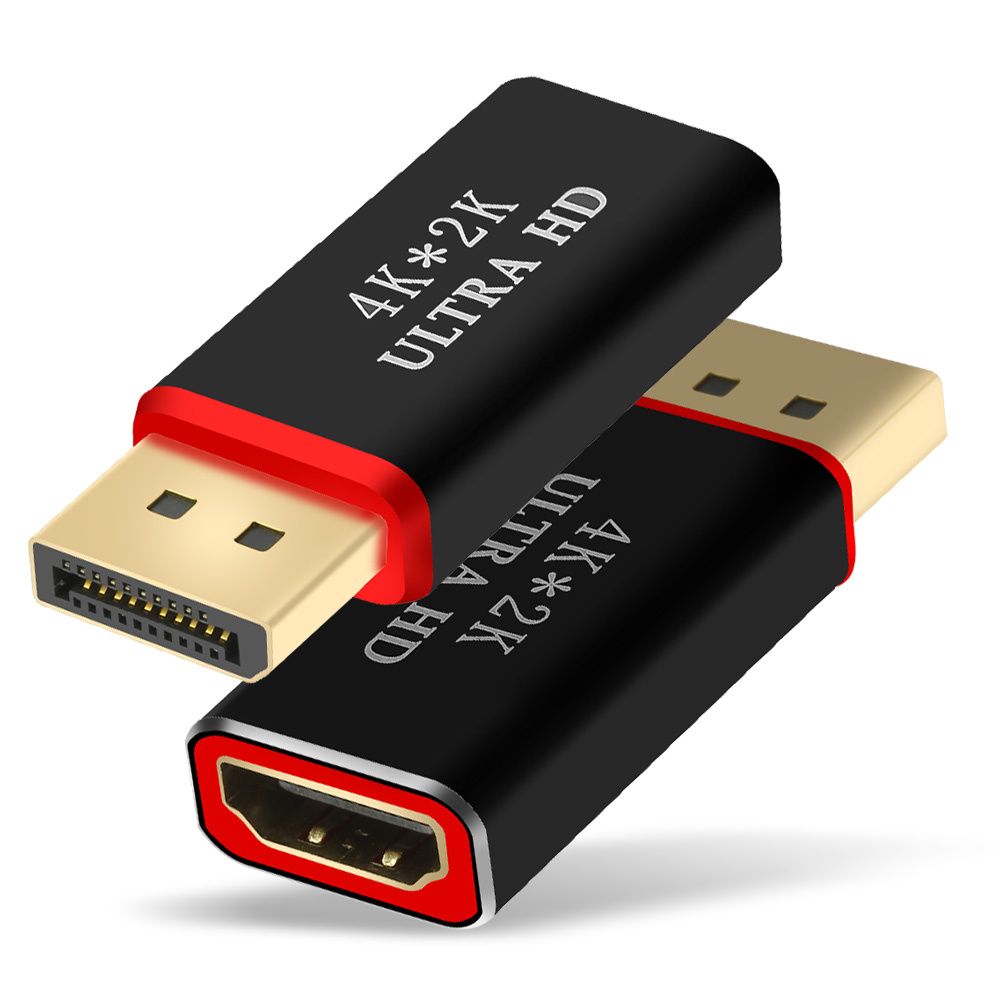
I've been using them exclusively for a couple years now with no problem. Mind my display resolution is 1920 x 1080 and you need to prop up the far side of the plug with something because the cable weighs it down against it's connection and like you said, don't disturb it.
17 posted on
01/04/2023 6:54:54 AM PST by
conservativeimage
(For the love of life we’ll defeat this. They may tear us down but we'll go down fighting. Won't we?)
To: Paul R.
google: hdmi capacity
regular hdmi cables will not suffice.
you’ll want hdmi 2.0 cables which support up to 4K @ 60 fps.
hdmi 2.1, on the other hand, promises 4K @ 120fps and 8K @ 60fps
18 posted on
01/04/2023 7:23:07 AM PST by
sten
(fighting tyranny never goes out of style)
To: Paul R.
We use similar adaptors on PCs here at my job with perfectly fine results. Don’t spend a lot of money as your just paying either for the name brand or gold contacts, which are totally unnecessary for HDMI or DP cables.
19 posted on
01/04/2023 11:56:48 AM PST by
Intar
To: Paul R.
Is USB-C to HDMI a possibility? Many new PCs and laptops have few other ports than USB-C.
24 posted on
01/05/2023 7:15:30 AM PST by
Lou L
(Health "insurance" is NOT the same as health "care")
FreeRepublic.com is powered by software copyright 2000-2008 John Robinson