Skip to comments.
Apple releases iOS 13.1, iPadOS 13.1, Watch 5OS for AppleWatch Ver. 1 & 2
MacDailyNews ^
| September 24, 2019
Posted on 09/26/2019 3:04:38 PM PDT by Swordmaker
Apple releases iOS 13.1
Tuesday, September 24, 2019 1:11 pm
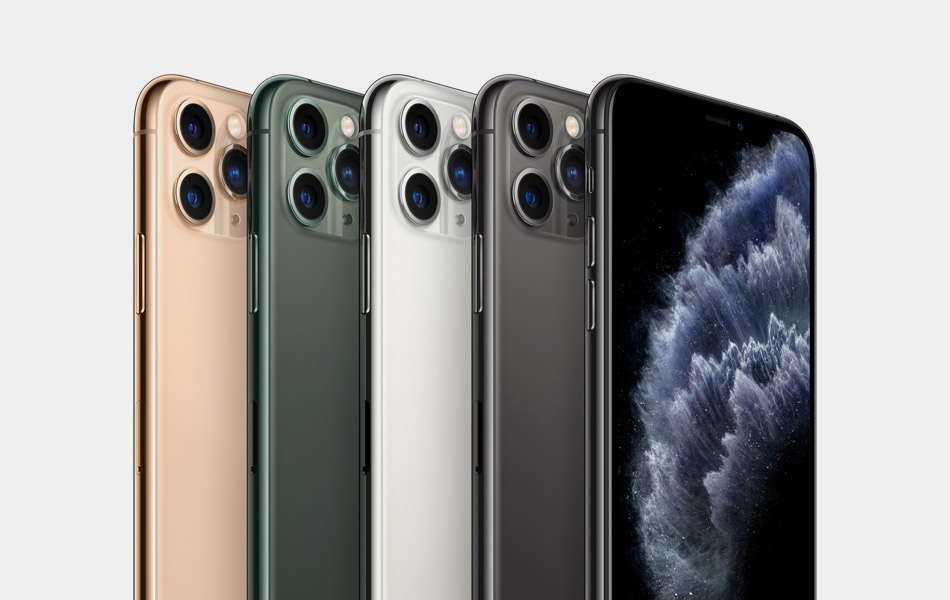
Apple today released iOS 13.1 which includes bug fixes and improvements, including AirDrop with Ultra Wideband technology on iPhone 11, iPhone 11 Pro, and iPhone 11 Pro Max, suggested automations in the Shortcuts app, and the ability to share ETA in Maps.
AirDrop
- Ability to select who you want to AirDrop to by pointing from one iPhone 11, iPhone 11 Pro, or iPhone 11 Pro Max to another using the new U1 chip with Ultra Wideband technology for spatial awareness
Shortcuts
- Suggested automations in the Gallery personalized to your daily routine
- Personal and home automations for automatically running shortcuts based on triggers
- Home app support for shortcuts as advanced actions in the Automation tab
Maps
- Share ETA to send your estimated time of arrival while your route is in progress
This is an excerpt, read more at the article on iOS 13.1 release.
Apple releases iPadOS 13.1
Tuesday, September 24, 2019 1:28 pm
(This update actually releases iPadOS 13 prior to the officially announced release date of September 30, 2019. You can read about what iPadOS 13 can do for you on Apples iPadOS webpage. Swordmaker)
Apple today released iPadOS 13.1 includes bug fixes and improvements, including AirDrop with Ultra Wideband technology on iPhone 11, iPhone 11 Pro, and iPhone 11 Pro Max, suggested automations in the Shortcuts app, and the ability to share ETA in Maps.
AirDrop
- Ability to select who you want to AirDrop to by pointing from one iPhone 11, iPhone 11 Pro, or iPhone 11 Pro Max to another using the new U1 chip with Ultra Wideband technology for spatial awareness
Shortcuts
- Suggested automations in the Gallery personalized to your daily routine
- Personal and home automations for automatically running shortcuts based on triggers
- Home app support for shortcuts as advanced actions in the Automation tab
Maps
Share ETA to send your estimated time of arrival while your route is in progress
iPadOS is compatible with the following iPad models:
- iPad (5th-generation)
- iPad (6th-generation)
- iPad (7th-generation)
- iPad mini 4
- iPad mini (5th-generation)
- iPad Air 2
- iPad Air (3rd-generation)
- 9.7-inch iPad Pro
- 10.5-inch iPad Pro
- 11-inch iPad
- 12.9-inch iPad Pro
This is an excerpt, read more at the article on iPadOS 13.1 release.
Apple releases watchOS 5.3.2 for Apple Watch Series 1 and 2
Thursday, September 26, 2019 1:37 pm
Apple today released watchOS 5.3.2 for Apple Watch Series 1 and Apple Watch Series 2 devices.
watchOS 5.3.2 provides important security updates and is recommended for all users.
For information on the security content of Apple software updates, please visit this website:
https://support.apple.com/kb/HT201222
Note: watchOS 6 will be available for Apple Watch Series 1 and Apple Watch Series 2 later this fall.
TOPICS: Business/Economy; Computers/Internet
KEYWORDS: appledailynews; ios131; ipados131; watchos532
Navigation: use the links below to view more comments.
first 1-20, 21-25 next last
To: ~Kim4VRWC's~; 1234; 5thGenTexan; AbolishCSEU; Abundy; Action-America; acoulterfan; AFreeBird; ...
Apple releases iPadOS 13.1 days early from official release date of September 30, 2019, plus also releases iOS 13.1 and watchOS 5.3.2 for AppleWatch version 1 and 2. PING!

APPLE iPadOS 13 released early
iOS 13.1 update, and WatchOS for AppleWatch 1 & 2
PING!
If you want on or off the Apple/Mac/iOS Ping List, Freepmail me.
2
posted on
09/26/2019 3:08:41 PM PDT
by
Swordmaker
(My pistol self-identifies as an iPad, so you must accept it in gun-free zones, you hoplaphobe bigot!)
To: Swordmaker
Not sure if its tied to this update, but my iPhone 7 seems to be using up battery power more quickly than before.
3
posted on
09/26/2019 3:19:38 PM PDT
by
Skybird
4
posted on
09/26/2019 3:19:47 PM PDT
by
Swordmaker
(My pistol self-identifies as an iPad, so you must accept it in gun-free zones, you hoplaphobe bigot!)
To: Skybird
Not sure if its tied to this update, but my iPhone 7 seems to be using up battery power more quickly than before. Your iPhone 7 battery may be getting old. In your Settings, on the first screen, look in the third set of set just above Privacy at the bottom and press on Battery. Check Battery Health to see what the capacity of your battery is. It will tell you if its time to replace it.
5
posted on
09/26/2019 3:27:05 PM PDT
by
Swordmaker
(My pistol self-identifies as an iPad, so you must accept it in gun-free zones, you hoplaphobe bigot!)
To: Swordmaker
Been using iOS 13 since beta. Two words: Dark Mode.
6
posted on
09/26/2019 3:27:25 PM PDT
by
Spruce
To: Spruce
I love iphone dark mode, just all my yelp pictures are negatives. Oh well. That is what the iPad is for I guess.
7
posted on
09/26/2019 4:16:08 PM PDT
by
Freedom_Is_Not_Free
(What profits a man if he gains the world but loses his soul?)
To: Swordmaker
Now Rush Limbaugh will be not be worth listening to for the next few days as he wastes airtime blabbering about how great these new products from Apple are.
Fortunately the weekend is coming. Perhaps he will have gotten this out of his system by next week.
8
posted on
09/26/2019 4:19:28 PM PDT
by
upchuck
(Democraps say the President is out of control. They mean the President of out of THEIR control.)
To: Skybird
Major update. The little squirrels are busy running around gathering nuts of info, cataloging and indexing it.
Keep it plugged in As much as possible. It will settle down in a day or two depending on how loaded your system is.
9
posted on
09/26/2019 4:22:10 PM PDT
by
AFreeBird
To: Swordmaker
Well, my iPhone was updated yesterday and it is sooooo effed up I cant even believe it! Zero noise while texting, stupid volume indicator, great customizable emojis (dumb freaking millennials!), pics are in weird spots, maps suck, etc. Apple is crap! And they are tracking you more today than yesterday.
10
posted on
09/26/2019 4:22:54 PM PDT
by
Maskot
(Put every dem/lib in prison........like yesterday!!!)
To: Maskot
This is why I never load an OS from anyone until at least the first update/service pack
11
posted on
09/26/2019 4:38:47 PM PDT
by
null and void
(<---powered by the sunshine of your love)
To: Swordmaker
None of your links to MacDailyNews work.
12
posted on
09/26/2019 4:50:43 PM PDT
by
bkopto
To: Swordmaker
13
posted on
09/26/2019 7:06:29 PM PDT
by
beethovenfan
(Mene, Mene, Tekel, Upharsin)
Apple releases iOS 12.4.2 for older iPhones, iPads, and iPod touch 6G Thursday, September 26, 2019 1:27 pm
Apple today released iOS 12.4.2 which includes improvements, provides important security updates, and is recommended for all users.
iOS 12.4.2 (Build 16G114) is for:
- iPad Air (Wi-Fi) (iPad4,1)
- iPad iPad Air (Cellular) (iPad4,2)
- iPad iPad Air (China) (iPad4,3)
- iPad iPad mini 2 (Wi-Fi) (iPad4,4)
- iPad iPad mini 2 (Cellular) (iPad4,5)
- iPad iPad mini 2 (China) (iPad4,6)
- iPad iPad mini 3 (Wi-Fi) (iPad4,7)
- iPad iPad mini 3 (Cellular) (iPad4,8)
- iPad iPad mini 3 (China) (iPad4,9)
- iPad iPhone 5s (GSM/LTE) (iPhone6,1)
- iPad iPhone 5s (CDMA/LTE) (iPhone6,2)
- iPad iPhone 6 Plus (iPhone7,1)
- iPad iPhone 6 (iPhone7,2)
- iPad iPod touch 6G (iPod7,1)
Apple releases Safari 13.0.1
Tuesday, September 24, 2019 7:56 pm
Apple today released Safari 13.0.1 which contains feature improvements as well as privacy, security and compatibility enhancements and is recommended for all users.
This update:
- Includes an updated start page with Favorites, frequently visited, and most recently visited websites
- Provides a warning if a weak password is typed when signing in to a website and helps to upgrade it to a strong password
- Adds the ability to enable Picture in Picture from the audio button in a tab
- Enables jumping directly to an already-open tab from the search completion list when the website address is typed into the Smart Search field
- Adds support for authentication using USB security keys on supported websites
- Fixes an issue that prevents signing into Google in Internet Accounts in System Preferences
For detailed information on the security content of this update, please visit: https://support.apple.com/kb/HT201222.
14
posted on
09/26/2019 9:27:38 PM PDT
by
Swordmaker
(My pistol self-identifies as an iPad, so you must accept it in gun-free zones, you hoplaphobe bigot!)
To: bkopto
Try the repost I just made above. I discovered a glitch in a shortcut Ive been using for years that got changed in the latest update that now doesnt quite work by causing a problem when pasting a webpage address into it. The issue is that I use the three letters "hrf to enter the following string into my edit window:
<a href=></a>
This has worked fine for the last decade or so, but with the last update, Apple helpfully (not) added an automatically space at the beginning of any paste. Oops. That makes the URL address pasted inside the double quotation marks automatically invalid. John Robinsons FreeRepublic code parser designed to prevent error messages, intercepts such errors and automatically returns the user to the page where you attempted the invalid link from. Now that I know of this paste glitch I can watch for it.
15
posted on
09/26/2019 9:47:23 PM PDT
by
Swordmaker
(My pistol self-identifies as an iPad, so you must accept it in gun-free zones, you hoplaphobe bigot!)
To: ~Kim4VRWC's~; 1234; 5thGenTexan; AbolishCSEU; Abundy; Action-America; acoulterfan; AFreeBird; ...
This is a subsequent ApplePingList Ping for another iOS and iPadOS update which fixes bugs that became apparent after the release on Tuesday of iOS 13.1 and iPadOS 13.1.
Apple releases iOS 13.1.1 and iPadOS 13.1.1
Friday, September 27, 2019 1:58 pm
Apple today released iOS 13.1.1 includes bug fixes and improvements for your iPhone. This update:
- Fixes issues that could prevent iPhone restoring from backup
- Addresses an issue that could cause battery to drain more quickly
- Fixes an issue that could impact recognition of Siri requests on iPhone 11, iPhone 11 Pro and iPhone 11 Pro Max
- Resolves a problem where Safari search suggestions may re-enable after turning them off
- Addresses an issue that could cause Reminders to sync slowly
- Fixes a security issue for third-party keyboard apps
For information on the security content of Apple software updates, please visit this website: https://support.apple.com/kb/HT201222
16
posted on
09/27/2019 4:07:45 PM PDT
by
Swordmaker
(My pistol self-identifies as an iPad, so you must accept it in gun-free zones, you hoplaphobe bigot!)
To: upchuck
Fortunately the weekend is coming. Perhaps he will have gotten this out of his system by next week. If he irritates you so much, why do you listen to him?
17
posted on
09/27/2019 4:17:51 PM PDT
by
itsahoot
(Welcome to the New USA where Islam is a religion of peace and Christianity is a mental disorder.)
To: Maskot
Apple is crap! And they are tracking you more today than yesterday. Why don't you make a YouTube video and smash it with a Sledge hammer, then brag about how much cheaper and better an android phone is, get lots of clicks.
18
posted on
09/27/2019 4:20:14 PM PDT
by
itsahoot
(Welcome to the New USA where Islam is a religion of peace and Christianity is a mental disorder.)
To: Freedom_Is_Not_Free
Also note, you can schedule dark mode. If you like light mode during day you can flip a switch and dark mode comes on at sundown. Back to light at sunrise. OR...you can custom set the time to switch between modes. Just another option.
For those of you that have, I have not experienced any problems so far with this latest update. None.
To: itsahoot
Chill baby! Your panties are wadded up just a bit 😉
20
posted on
09/27/2019 6:23:42 PM PDT
by
Maskot
(Put every dem/lib in prison........like yesterday!!!)
Navigation: use the links below to view more comments.
first 1-20, 21-25 next last
Disclaimer:
Opinions posted on Free Republic are those of the individual
posters and do not necessarily represent the opinion of Free Republic or its
management. All materials posted herein are protected by copyright law and the
exemption for fair use of copyrighted works.
FreeRepublic.com is powered by software copyright 2000-2008 John Robinson