On the lighter side, I saw an awesome T-shirt the other day and said "ShadowAce needs one of those.":
"fsck around and find out"
Posted on 03/11/2026 7:23:49 AM PDT by dennisw
Some rumored Windows 12 features could frustrate users and be the reason Linux finally starts looking better.
First off, the rumor about a 2026 release for Windows 12 is not true. Someone translated a German article about Windows 12 releasing in 2026, and it proved to be untrue (and was later retracted). Second, there are a lot of other "speculations" as to what Windows 12 will be like.
What could cause a large migration? I'm going to set the rumors aside, and instead, focus on what I believe will happen (based on the past, the present, and the future of technology). It's all about AI.
Microsoft is heavily invested in Copilot and has zero intention of backing down from its AI. Although many have claimed the rumors that Microsoft is planning on plunging Windows 12 deeper into artificial intelligence waters are false, I would argue that they are true.
Let me explain.
Also: The 6 Linux distros I expect to rule 2026 - as someone who's tested hundreds (and for decades)
AI started as third-party services that consumers could use. Those services then transformed into paid services. The paid services were soon replaced by free services, by way of various integrations. For example, the Opera browser gave us Aria, which we could all use for free. Google gave us Gemini. Apple gave us Apple Intelligence (sort of?), and Microsoft gave us Copilot.
AI then evolved into agentic AI, which could automate tasks like shopping, and that agentic AI started filtering into various browsers (some free, some not).
Then, AI started trickling its way into operating systems, with Copilot, Gemini, and Apple Intelligence becoming more and more deeply embedded. All of a sudden, AI was integrated into web browsers, email, notes, office suites, and more. What this meant is that user-facing apps were now intrinsically tied to AI.
The next evolution Here's where I think this goes with regard to Windows (ergo, Windows 12):
AI will take the place of Windows Service Manager, so users won't have to worry about managing services. AI will take control of software updates. AI will begin reading what's on users' screens (so it always has context for what users are asking). AI will be used for natural language system control (such as "I need to close the app that's consuming the most RAM"). AI will be capable of local processing (which will require even more powerful systems). AI will be able to monitor long-running tasks (such as research), and will be able to assist in that process. AI will be used for semantic search on the desktop. AI will be used for data collection. As you can see, I believe AI will be so deeply embedded in the next iteration of Windows that it will be impossible to break that tie. If you want an AI-less Windows, you'll be out of luck, and once Microsoft makes that change, there will be no going back.
At the same time, the Windows UI probably won't undergo much of a change, and it will most likely include even more ads and more data collection.
Also: I've used Windows for decades, but I tried Linux to see if it's truly 'easy' now - and one thing surprised me
When you put all of this together, it points to migration. Users are only willing to take so much before they finally break and change, and Windows 12 might be the metaphorical straw v. camel. And I believe that what we'll see with Windows 12 will make the migration from Windows 10 to Linux look quaint.
And then, you add to that the continued evolution of the Linux desktop into something that any user (of any skill level) can work with and enjoy (without all the caveats that come with Windows), and you have a perfect storm. Linux on the desktop will never:
Include ads. Be deeply interwoven with AI. Require users to purchase a new PC. Collect user information or track users' behavior. Cost a penny. Sounds appealing, right? Well, the combination of where Windows is going and where Linux is not going will have consumers flocking to the open-source operating system.
And there you have my take on the whole Windows 12/Linux debate.
Rufus USB maker will allow you to install Windows 11 on an older computer. Ask your favorite AI about it. Rufus is not an updater. You need to copy all your important data onto a large flash drive. Then clean install Windows 11 with the help of Rufus.
I’ll be honest, the new Macbook Neo I supsect is going to be a HUGE disruptor in the Windows personal laptop market.
I think a ton of college students will not be getting Neo’s rather than a cheap windows machine. When the calculus was a $400 windows machine or $1200 for the cheapest mac, a lot of cheap plastic, low spec windows machines were sold. When the calculus is $400 windows machine, or a $500 ($100 off for students) Macbook NEO, I suspect highly that a lot of folks will decide the extra $100 is worth it.
This isn’t something that is going to drastically change the enterprise overnight, but long term... I don’t see how this doesn’t continue to eat away at MS’s market share.
ChromeBook already owns the super-cheap, and the grade school/high school educational market. If the move to real machines by these kids now becomes largely a step to the Mac Eco System, not just the rich status driven kids or the computer geeks, but the mainstreams it, its hard to see how this trend won’t further move up into the enterprise in time.
We shall see, but one of the biggest knocks on apple from its founding, that being price and value, just largely evaporated if this thing even remotely performs like it appears it should.
We shall see how this all shakes out, but I know if was a maker of cheap low end PC laptops, I’d be nervous as hell.
Windows 12 - the ‘Hindenburg’ of operating systems is my prediction.
Security Spy running on a cheap Mac Mini is a pretty good Blue Iris replacement.
Nothing on a PC or Mac comes close to Ubiquiti’s Unifi Protect, but that would mean a complete overhaul of your network and replacement of all your cameras.
Mint Linux is the easiest Linux to start with. You can download it, get it onto a bootable flash drive. Then boot into Mint desktop and poke around to see how you like it. Mint is great for web surfing (use Chrome, Edge what have you) and “office” tasks. Other software you might have to install.
NOTE: Booting into Mint with a flash drive does not affect or wipeout the Windows 10 or 11 that is installed on your computer.
“I think a ton of college students will not be getting Neo’s rather than a cheap windows machine.”
The display is only 13” which is not helpful for real learning and absorbing material. Such small size leads to furtive skimming. Though this tiny Neo thing can be hooked into a larger 24” external monitor......13” Neo is good for taking notes in class and ultra portability.
My take is that 15.6” is minimum size laptop display for a student. Then you have 16” and 17.3” laptops.
But...this time for sure!
Various prognosticators have been saying this since Win XP...
Folks had better hold onto their copies of Windows 7-10-11, back them up *(The ISO’s i mean), because they soon disappear from MS site in favor of the new OS- The only problem though will be that eventually the older OS’s will lose updates and be vulnerable- but for folks like me who dual boot with linux, and only use windows offline, it will be fine to use for years to come (Until new software refuses to work on anything but new windows-)
I have ‘Tiny 11’ (and tiny 10) ready to go on a thumbdrive- these are stripped of all or most MS nonsense- and optimized for best performance, but I’ll have to make new thumbdrives of them to be sure incase one drive poops the bed-
Individuals, mebbe. But, face it, most individuals are too lazy to vote .
As to companies, never. Too many greased palms.
On the lighter side, I saw an awesome T-shirt the other day and said "ShadowAce needs one of those.":
"fsck around and find out"
"Flocking?" Hardly. I can't imagine a mass migration to Linux until the most popular apps seamlessly integrate with Linux.
your opinions can be whatever they are, but the recommended size for college students, by colleges is 13-14” screens.
You are welcome to believe that should be more, but that’s what colleges recommend, and as someone who spends a good bit of time on a University campus, I can tell you most do not have 15” let alone 17” laptops.
You are correct—I need one. :)
I recall specifically that MS stated that 20 would be the last new OS you would ever need. So that seems it would make forced 11 migration a criminal fraud situation. Where are the prosecutions?
That’s win10 would be last, not 20.
A favorite of mine.
I have others such as Kali, Parrot, Centos on some virtual machines.
I’m looking to earning certification in Linux, AI, and project management. It’s a pricey hobby for me.
What you are asking about has been available for years now and works very well. People just are not aware of it because this is a feature that has not been hyped for some reason.
We paid $175 for used Samsung S20+ phones about a year ago. They were released in 2020 and can be hooked up to a portable monitor through their USB ports and use a Bluetooth Keyboard and Mouse. They run the actual Microsoft Office Apps and many of the open-source replacements of course they are no slackers when it comes to editing images and video either.
The Android desktop that came with them is called Samsung DeX (short for Desktop Experience). I use them with AR Glasses or portable monitors. On the road phone itself is used as a touchpad and I use AR Glasses that cost $200 on sale at Amazon. Mine are RayNeo Air 2 AR Glasses. The later versions were on sale late last year.
We have splitters which allow the phone to be charged and use the monitors or AR glasses at the same time, but they go for quite a while using the phones built in 4500 mAh batteries without this. The newer versions of this phone cost more, but are more capable.
I have been a computer hobbyist for many years, so I have not given up my more typical laptops and desktops, using Windows and Linux operating systems, but for portability the phones with AR glasses come in very handy as laptop replacements that you can carry around in your pockets.
https://www.gechic.com/en/portable-touch-monitor-for-samsung-dex/
I don't use the touch monitor advertised... I just have one that I bought from Amazon which cost $100. It can be plugged into an A/C adapter but the phone's USBC port can power it as well.
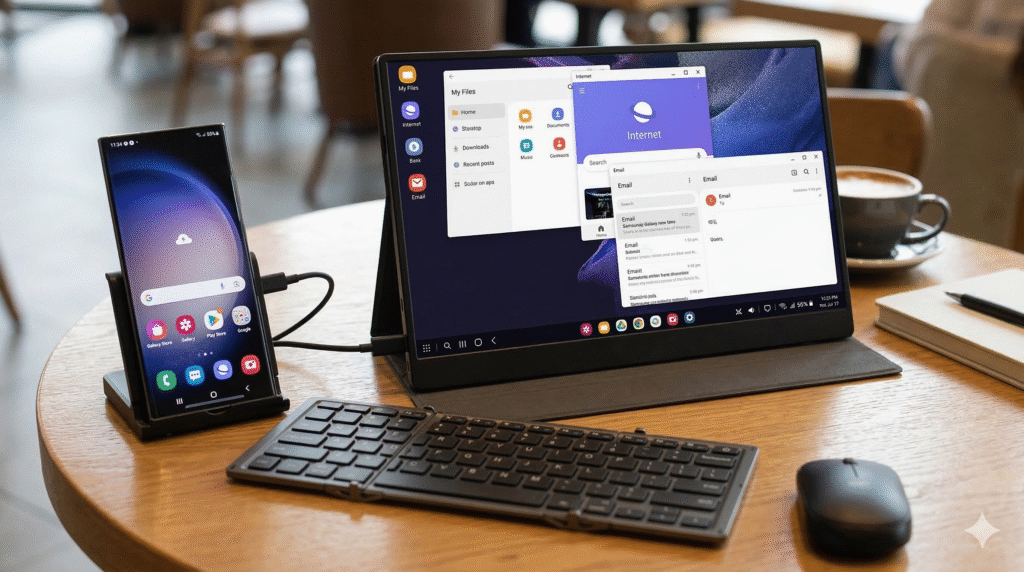
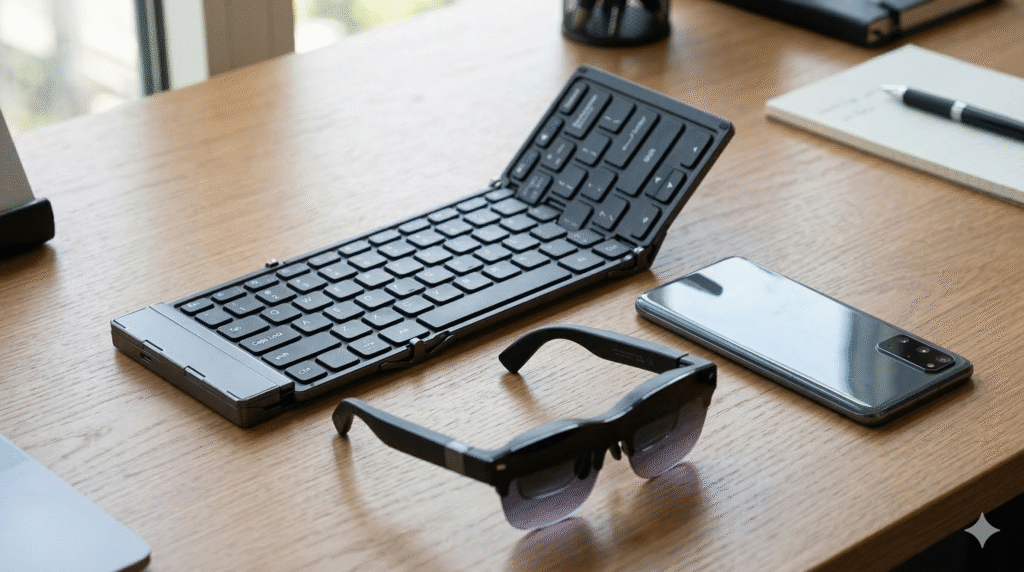
The above picture is missing just the USBC cable that goes from the phone to the AR Glasses. But that is all you need to bring along to do normal computer tasks on the road .
A friend of mine recently used Ubuntu installed on a 128GB USB flash drive to hack into an old Laptop running windows 10 with a sign on password only my deceased brother knew.
Disclaimer: Opinions posted on Free Republic are those of the individual posters and do not necessarily represent the opinion of Free Republic or its management. All materials posted herein are protected by copyright law and the exemption for fair use of copyrighted works.