Posted on 09/18/2025 6:28:11 PM PDT by fireman15
Mini-PCs are space-saving, quiet, versatile and often cheaper than a classic desktop PC. We discuss the advantages and what you should look out for when buying in this guide.
Mini-PCs have been experiencing a real boom in recent years. No wonder, because these small desktop computers are powerful, space-saving, and flexible. This guide shows what a mini-PC actually is, where its strengths lie, and who can benefit the most from buying one.
Also, be sure to check out the PCWorld deals page where we highlight the best deals from around the web on mini-PCs, like the latest stellar deal on a GMKtec M3 Plus mini-PC, and more. In fact, mini-PCs are constantly going on sale for staggeringly low prices, so keep your eyes peeled while shopping and keep checking back with us to see the latest and greatest deals. (If you’re reading this article the day it goes live, we’re also tracking the best Amazon Prime Day mini PC deals.)
What is a mini PC? A mini-PC is a fully-fledged computer in a small format. In contrast to laptops, mini-PCs do without a battery and screen, which saves weight on the one hand and makes the small housing possible on the other—many models have a volume of less than one liter. At the same time, flexibility remains high: a monitor, mouse, keyboard, or external drives can be freely selected and easily replaced if necessary. If you like it neat and tidy, mount the mini-PC behind the monitor to save space or integrate it discreetly on the desk.
Despite their compact design, modern mini-PCs offer enough power for everyday tasks such as office work, surfing, streaming and even gaming. If you know your way around, you can even build your own mini PC with the right components.
(Excerpt) Read more at pcworld.com ...
I think that I'd find it very hard to browse Free Republic and post comments without a screen!
My "Surface 3" laptop computer has a volume of less than half a liter.
So why could I possibly need a mini-PC?
Regards,
“I have always meant to get a Raspberry Pi kit to play with.”
The most popular use is to set up personal servers for decentralized P2P networks...
Speaking of mini, here is something you guys might get a kick out of... lol
Madman Sets Up Entire Server on Disposable Vape, Hosts Its Own Website:
https://futurism.com/disposable-vape-hosts-website
An IBM computer with a one or two Gb drive was cutting edge, and cellphone service was $.60 a minute. I can’t imagine what we’re going to have available in another 20-30 years. I probably won’t be around to see it, lol.
Started in computers in the late 80s and our first work laptop was a Compaq about the size of a small suitcase that weighed as much as one filled with bricks. We used it to telnet into our network equipment.
We had computers that booted up with floppies and ecstatic when they cam out with 10 MB hard drives. Then you could create a memory partition on it and put the boot files on the HD and you were screaming.
I still remember installing Windows on computers using a stack of 30 floppies only to have the install crap out at the end.
I’m stealing this one. Point on and hilarious.
I run Plex on my Raspberry Pi, serving up media.
My Roku connects to it so I can watch on the TV or my computer, depending on my needs.
I have AR Glasses which plug into my 5-year-old Samsung A20+ phone's USB port. They provide a huge screen which is high resolution and is very visible. I use a Bluetooth mouse and keyboard. Samsung has a desktop system called “DeX”. The applications on the phone such as the Chrome Browser, Edge, Microsoft Word, Excel, and etc., etc... work basically the same as they do on Windows
I can use the same glasses with a mini-PC but I usually plug in a portable monitor that can get both its power and video signal from a USB C cable when running Windows. It typically needs a separate HDMI cable with most versions of Linux.
When I am on the road. I run the entire setup either by plugging it into a cigarette lighter adapter in the vehicle, or using a small 10 AH LiFePO4 battery which weighs a little more than 2 pounds. The entire setup weighs about the same as a laptop, but is less convenient to pack around and assemble. So, I usually just use a laptop.
But I often set up a small office in the back of my Ford Explorer when my wife has hours long appointments. I usually use the LiFePO4 battery even with a laptop to make sure that I do not run down the car battery after hours of use. And the mini-PCs and portable monitor work well in this situation.
I am going to have a whole new reason to use a mini-PC in the back of the Explorer starting on Sunday. I ordered a mini-PC that Grok tells me should provide a decent experience running Microsoft Flight Simulator. My gaming laptop uses a lot of power when running Microsoft Flight Simulator. It has a pretty big battery built in but I have to take along a battery from my eBike and my 48V inverter to use it in the back of the Explorer to use it for more than a short time.
The new little mini-PC will be much more energy efficient and should run fine using my cigarette lighter adapter to power it and the monitor, or my AR glasses. But I will let a couple people here who were interested know how this works out. When I am using Microsoft Flight Simulator on the road I use the 2020 version because 2024 is and extreme data hog while at this point it finally does provide a slightly better experience.
Here is the mini-PC that I purchased last night to do this...
https://www.amazon.com/dp/B0FC292HNC
This is the monitor that I use with it on the road:
https://www.amazon.com/dp/B0DPGYRL4C
This is the mouse and keyboard:
Except that on a 5-year-old Samsung S20+ phone that I paid $150 for and a Bluetooth mouse and keyboard that were $18 together hooked into either a $99 monitor or a pair of AR glasses... the experience using Samsung DEX which comes with the phone is nearly equivalent to a typical desktop computer. And the only thing funny about the setup is that so many people are not aware that the technology exists and that a 5-year-old cell phone can power the system.
Phone... I bought mine on eBay which saved about $40 compared to Prime:
https://www.amazon.com/Galaxy-S20-5G-Unlocked-Smartphone/dp/B08FRQMW31
Touch Screen Portable Monitor which was on sale for $70 when I purchased it.
https://www.amazon.com/dp/B0DPGYRL4C
These are the Bluetooth mouse and keyboard which come to less than $20 but have been working fine for months
That is almost always the best idea... Unfortunately, last night I purchased another mini-PC that is a lot more capable than the two most recent acquisitions that I have been using. It was on sale for $100 off and I just could not resist... Bad self control! Bad! Bad! Bad!
Which has made me finally make the jump.
I just ordered a Mac Mini earlier this AM, it arrives tomorrow.
When I travel, an iPad Air with Magic Keyboard is more than enough for my purposes.
My wife will still has a Windows laptop that could handle Win11, mine could not. So I’ve got that to fall back on.
Once I clear off my Win10 box, I’ll probably put some flavor of Linux on it.
My gaming machine gave up the ghost so I might need one
well i dont think even black friday will be much more than $100 off, so probably a good buy
You can thank cell phone chip technology for that. Low power use has been an overarching design goal for longer battery life for a long time, and people have gotten pretty good at it.
RE: The RPi4 and RPi5
I’m no expert and do less roll/build your own stuff any more, but from what I can tell, the cool kids at r/homelab and such seem to have kicked the RPi to the curb in favor of mini PCs for in-rack use.
>Yes, Apple’s Mac Mini is pretty sweet.
And the Mac Studio is really sweet. I didn’t know they existed until a couple weeks ago.
I’m easing into the Mac ecosystem with a nice Mini. If I really get where I’m using it heavily and it’s not enough, I figure it will go into the rack for something, and I’ll get a Studio.
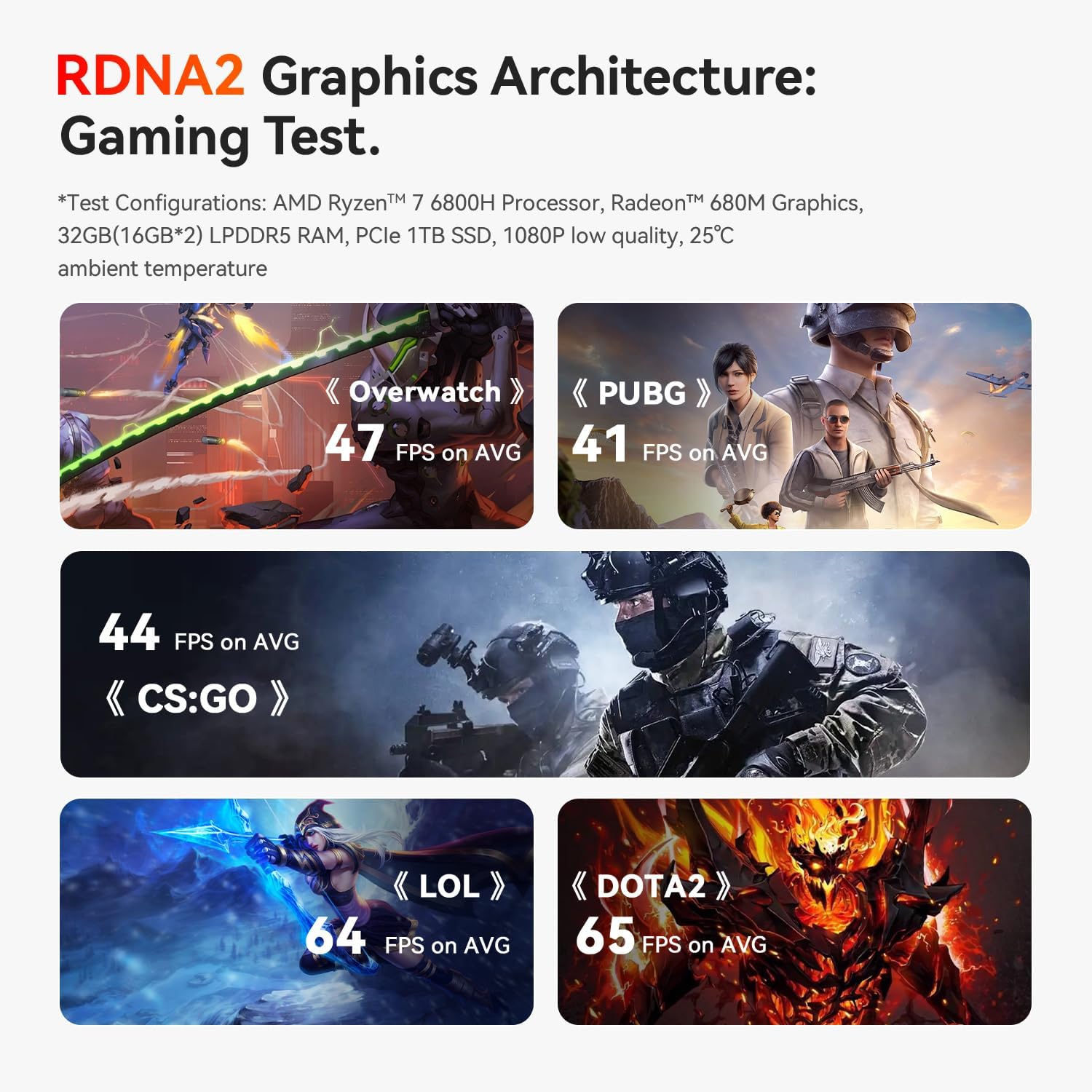
It is hard to say, the Ryzen 7 6800H was released more than 3 years ago. The Ryzen 7 8840U that is in my wife's laptop is a beast, but it does have a lower TDP (power settings) so it will be interesting to see how they compare.
It could very well be that by Black Friday one with a newer and even more capable APU (CPU with GPU co-processor on same chip) will be just as cheap, but this one look like it should be powerful enough to use with Flight Simulators while on the road without using a lot of power.
Disclaimer: Opinions posted on Free Republic are those of the individual posters and do not necessarily represent the opinion of Free Republic or its management. All materials posted herein are protected by copyright law and the exemption for fair use of copyrighted works.