Skip to comments.
Apple finally reveals the new Mac Pro — Remember the cheese grater look? It's back!
Endgadget ^
| June 3, 2019
| Nathan Ingraham
Posted on 06/11/2019 11:46:04 PM PDT by Swordmaker
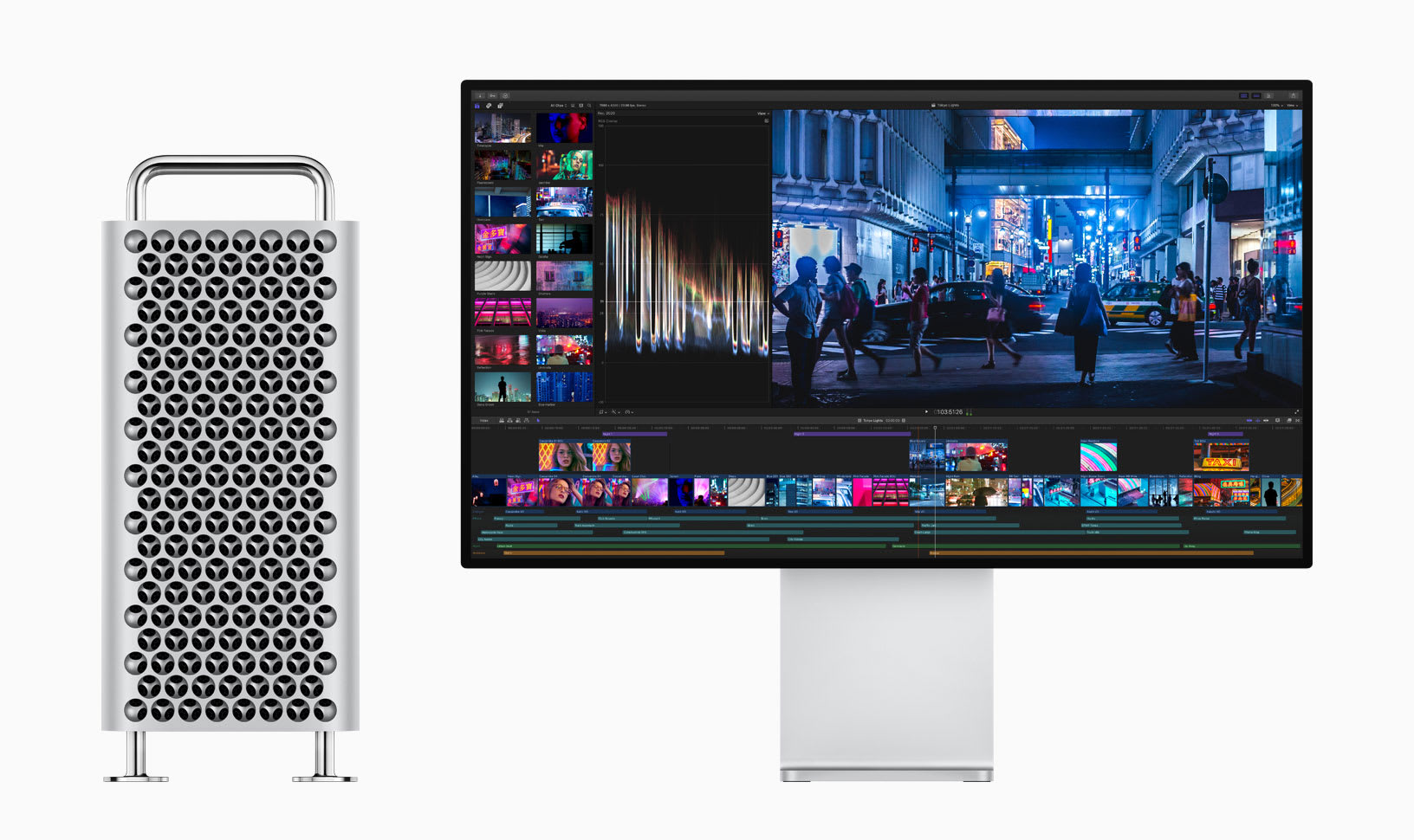
Apple's been teasing a redesigned Mac Pro for years now -- in fact, it's been well over a year since the company said it would be shipping the computer at some point during 2019 after originally promising it would arrive in 2018. Well, today, we're finally getting a look at the successor to that beautifully-designed trash can that Apple introduced in 2013 and then basically failed to upgrade for years. And guess what? It looks a lot like the old, cheese-grater style tower that Apple sold for years.


Monitor not included.
The Mac Pro has a stainless steel frame built around modularity and easy access to the components, something that should make it a lot easier to upgrade than the older model. The entire external case can be lifted right off after you unlock it.
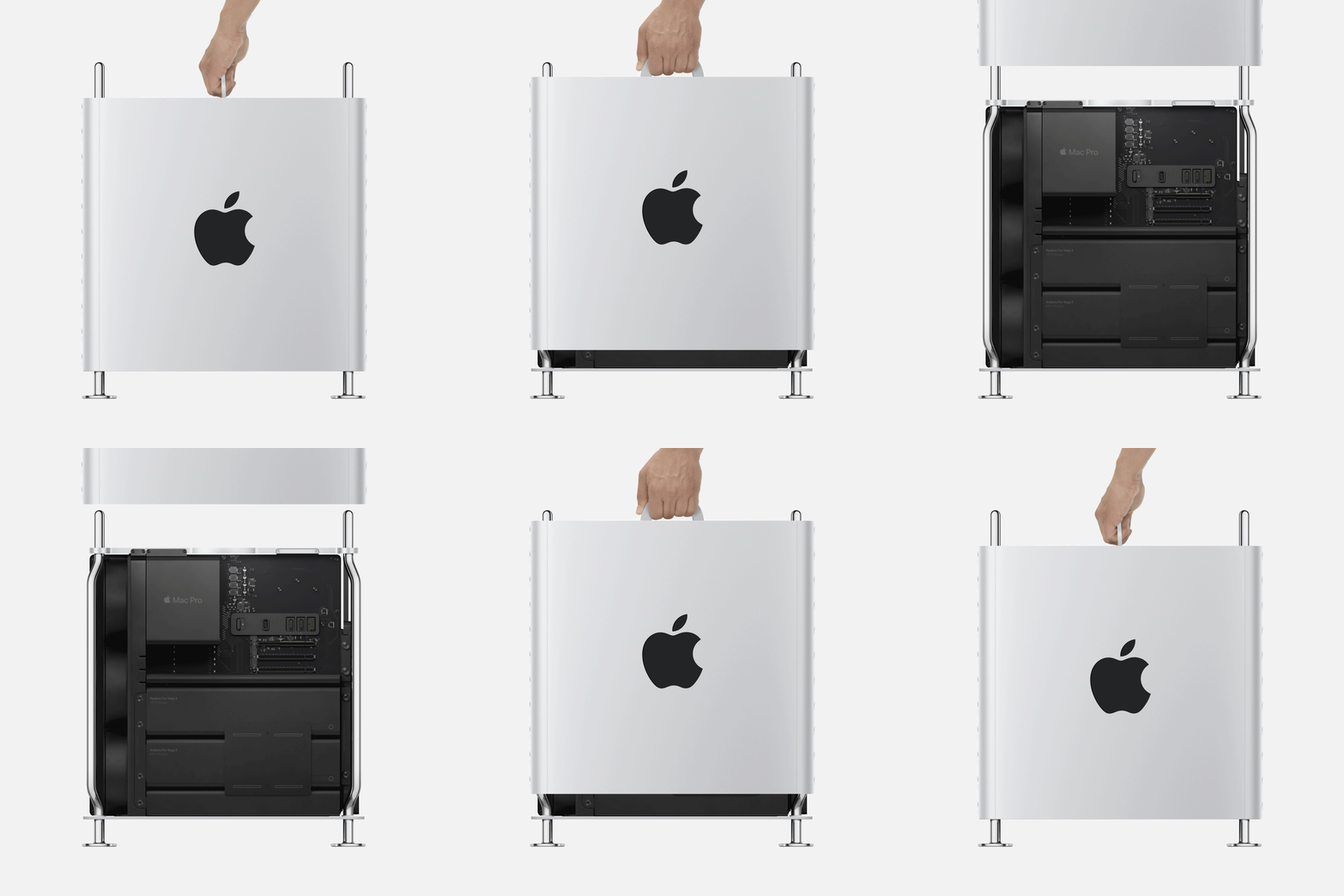
There's a new Intel Xeon processor on board that has up to 28 cores, and the computer supports a positively insane 1.5 terabytes of RAM. And Apple is bringing PCI expansion back, finally -- there are four double-wide slots, three single-wide slots and one half-width slot that Apple populates with its I/O card. That card features two Thunderbolt 3 ports, two USB-A ports and a 3.5mm audio jack. There are also two ethernet ports, as well. As for graphics, Apple will support up to two Radeon Pro Vega II GPUs, though that's not the default configuration.
For video editors out there, Apple is including its own custom hardware called Afterburner. It'll make the Mac Pro capable of playing three simultaneous 8K RAW video streams, or 12 4K streams. The card is capable for processing 6 billion pixels per second. To keep things cool, the Mac Pro has three fans and a blower that Apple says shouldn't be any louder than the iMac Pro when it's under load. (We'll have to hear that to believe it.)
Oh yeah, the Mac Pro has wheels! And Apple is even making its own display to go along with it, a 32-inch LCD display that Apple is calling a 6K Retina display with HDR and 6,016 x 3,384 resolution.
The base Mac Pro will include an eight-core Xeon CPU, 32GB of memory, a 256GB SSD and the Radeon Pro 580X graphics card and will start at $5,999. It'll ship this fall... start saving your couch change.
TOPICS: Business/Economy; Computers/Internet
KEYWORDS: applepinglist; newmacpro
Navigation: use the links below to view more comments.
first previous 1-20 ... 41-60, 61-80, 81-100, 101-108 next last
To: CodeToad
A Radeon Pro 580X is a mid-range card for such an expensive price tag. It’s the base option. It will turn out 5.6 Teraflops of graphics power with 36 GPUs with 2304 processors. It supports up to six 4K displays, two 5K displays, or two 6K 32” Pro Display XDRs. What’s the problem you have with that? If you need more processing power for your needs, upgrade. The Mac Pro will support up to FOUR AMD Radeon Pro Vega II Duos if you want more. . . That produces 56 Teraflops of computing power.
81
posted on
06/12/2019 6:22:28 PM PDT
by
Swordmaker
(My pistol self-identifies as an iPad, so you must accept it in gun-free zones, you hoplaphobe bigot!)
To: CodeToad
What kind of lousy software are you using that doesn’t provide checks? As the image is being exposed? Really? You don’t grasp the concept at all do you? X-radiation is not something you want to repeat because a computer glitched due to a RAM error while the SOFTWARE was doing its thing. Software works AFTER the RAM is loaded, CodeToad. The ECC works while the RAM is loading and checks as it is being loading against other RAM. SHEESH. It just seems to me your comments about ECC memory is just because you don’t have good software and you rely on the hardware, which your should never do if you truly are running safety critical software.
You have NO idea what you are talking about. The software does check, but you have to do both. Suspenders and belt. Over exposing patients to radiation can be considered assault, so we avoid doing it. We don’t do it. We use the best hardware for just that reason.
82
posted on
06/12/2019 6:32:29 PM PDT
by
Swordmaker
(My pistol self-identifies as an iPad, so you must accept it in gun-free zones, you hoplaphobe bigot!)
To: CodeToad
Except it is not bleeding edge. It is a mid-range computer that can be bought for far less otherwise. Even the graphics card is considered mid-ranged.
For $6,000 you can buy a real high-end machine running Linux or Windows. Where? We just priced out a Dell Workstation and an HP workstation configured to match the Mac Pro with close to the same processor (actually the 2018 version of the XEON), same SSD, same RAM, same I/Os, same power supply wattage, etc, but without the entire suite of software you get with a Mac. One, the HP, came in at $9,819.20, and the Dell because they did not even offer an equivalent Xeon, at $6,333.00. The HP was $4,424 more expensive than the Mac Pro, while the lesser capable Dell was $1,338 more.
The only way you can do what you claim is to redefine a workstation class machine to not be a workstation class machine and cripple it by eschewing ECC RAM and accepting consumer grade processors, going with an i9 Intel processor with only a 16MB cache instead of the 24.5MB cache of the Intel XEON processor, and forgoing the superior ECC RAM, dropping down to only 16 memory lanes from 64, one quarter of the capability of a true workstation class machine, and also cutting off the entire upgrade pathway the Mac Pro provides to expand in the future. That’s not a workstation class capable machine, it’s a mere desktop computer, and YOU don’t appear to know the difference.
83
posted on
06/12/2019 6:49:23 PM PDT
by
Swordmaker
(My pistol self-identifies as an iPad, so you must accept it in gun-free zones, you hoplaphobe bigot!)
To: Swordmaker
Back in the day my first Mac II cost 4700 for cpu, 499 for 8 bit color graphics card, 999 for a 13 in RGB color monitor with 256 colors , 300 for an extra 2 Mbytes of memory and 999 for a 99 Mbyte head drive - with academic discount.
That was a lot of money back then and the Mac had about half the performance of a SUN workstation
84
posted on
06/12/2019 7:06:26 PM PDT
by
rdcbn
To: ImJustAnotherOkie
Here are some specs that the Apple will never achieve. You even have to load software into these. Really????
Okie, Okie, Okie. You are ignorant of what you are talking about. So ignorant. I see you cut and pasted the spec list from from Sony’s 31” 4K reference monitor. ROTFLMAO!
Why should they achieve meeting the specifications of a FOUR K MONITOR???
Let me explain it to you in words even you might grasp, I’ll even highlight the ways the Apple is superior to the Sony monitor in RED PRINT for you:
Apple’s monitor is a SIX K MONITOR.
Apple’s new Monitor has 20,358,144 pixels, while your sony has only 8,847,360 pixels, just 43.45% of the screen area of the Apple monitor. The Apple has more than twice the screen acreage of the Sony.
Both being reference monitors have 10 bit color.
Your spec list says:
- BVM Grade OLED Panel
Meaningless, as this is just an engineering choice. Apple is using a different LCD approach that gives them more ability to adjust brightness and dimming with 567 Dimming Zones that cannot be done with OLED. - Full 4K 4096 x 2160 Pixel Resolution ROTFLMAO! The Apple monitor is 6016 by 3384 Pixel Resolution.
- Accurate Black and Color reproduction
That’s what a reference monitor does. Both are reference monitors. - Extremely wide viewing angle
Both have 89º from straight on in all orientations. - Supports DCI P3 and ITU-R BT.2020 wide color spaces*1
Apple in addition to both of these standards also supports the XPR color standard which Sony does not. - Gamut Marker (ITU-R BT.2020 colors outside 709 or DCI-P3)
Apple has always supported these in their standard monitors. - Auto White Adjustment
Always available on Apple’s standard monitors. - Quick input setting recall (Color space, EOTF, etc.)
Of course, plus ten more settings that Sony does not have! - Quick Response
ROTFLMAO! Apple’s response time is far faster than Sony’s response time. - High Dynamic Range (List of standard HDR ranges)
Of course Apple supports HDR, but Apple’s XDR monitor also supports the NEW XDR range which the Sony’s HDR monitor does not. - Standard luminance 100 cd/m2 (100% white signal input)
ROTFLMAO! Again. . .Sony’s 100 cd/m2 is abysmally low. The Apple has 1000 cd/m2! And peaks at 1,600 cd/m2!
The rest of the spec list are monitor specific junk having to do with screen menus and power settings that are all of course available in the Apple Monitor, or 4K limitation junk not relevant to a 6K monitor.
Rather than just merely achieving the list of specs you snidely posted as a challenge, o f the eleven reference monitor standards in the Sony spec list you posted, the Apple reference monitor equaled the Sony in four, and widely exceeded seven by a huge margin... at a price that is just 18% of the price of the lesser resolution Sony 4K Monitor.
Still ROTFLMAO!
85
posted on
06/12/2019 9:54:35 PM PDT
by
Swordmaker
(My pistol self-identifies as an iPad, so you must accept it in gun-free zones, you hoplaphobe bigot!)
To: ImJustAnotherOkie
By the way, okie, these Sony’s are sold with hoods and curtains for bright room use due to their lo/w light tolerances because of the 100 cd/m2 brightness to achieve their black levels.

It’s why they are always used in low light conditions. . . .
The 1000-1600 NIT Apple needs no shroud for bright room use.
86
posted on
06/12/2019 10:14:26 PM PDT
by
Swordmaker
(My pistol self-identifies as an iPad, so you must accept it in gun-free zones, you hoplaphobe bigot!)
To: Swordmaker
I wasn’t comparing them, merely saying that they are not in yhe same league. I have no idea what these $30k gizmos are used for but a computer monitor they are not.
87
posted on
06/13/2019 5:44:57 AM PDT
by
ImJustAnotherOkie
(All I know is The I read in the papers.)
To: Swordmaker
If you would look you would see that it was proposed to me that they were comparable which of course they are not.
Listen Fanbois who has no use for more than an iPad?
88
posted on
06/13/2019 5:47:52 AM PDT
by
ImJustAnotherOkie
(All I know is The I read in the papers.)
To: Swordmaker
It seems you left a few hundred features out. That’s why they cost $30k. Not $5k.
You pointed to this level of monitor for comparison, not me.
ROFLMAO-At the apple salesman.
89
posted on
06/13/2019 6:11:16 AM PDT
by
ImJustAnotherOkie
(All I know is The I read in the papers.)
To: ImJustAnotherOkie
It seems you left a few hundred features out. That’s why they cost $30k. Not $5k. They are not “features”. . . Just specifications. The Apple XDS monitor has similarly “features” that are specifications to it as well.
Let’s look at those “few hundred features” you snidely claim I left out. They seemed pretty obvious to me why I didn’t bother to cover them, but let’s cover them anyway. They certainly don’t rise to $27,000 worth of technology to account for Sony’s price differential. . . Especially when they really don’t exist at all!
- Sony S-Log Gamma Support
A feature required only when the monitor is used with proprietary Sony Video professional grade cameras in the field, not something that. 30” reference monitor is ever used for.
Apple supports Sony S-Log Gamma in Software when editing. - Multi-format capability
All modern multi-synch monitors support multi-format capability for the last 30 years - New Input Setting recall (Input, Color and Luminance setting)*4
Apple XPR monitor supports Input Setting recall - Flexible Marker*4 and Area & Aspect Marker
ROTFLMAO! On a 4K monitor? That’s function of the software you are using for editing. What is a 4K monitor going to mark, 4x5 and 1080P? Irrelevant on a 6K monitor. - Versatile 4K/QFHD Input Capability
Hello, OKIE, 6K remember???? - 3G-SDI Quad-link up to 4096 x 2160/48p 50p 60p, YCbCr 4:2:2 10-bit
Knock, knock on the head again, Okie, the Apple XDR is 6016 X 3384/ 47.95P, 48P, 50P, 59.94P. 60P, YCbCr, all aspects and 10 bit color depth, and more being Expanded (XPR), not just High (HDR) - HD-SDI Dual-link and 4K/2K XYZ signals
The Apple XDR Monitor has HD-SDI Quad-link and 8K/6K/5K/4K/2K XYZ as well as NTSC, SECAM, and PAL signals - Faster access to the status menu page*2
Irrelevant as this is a proprietary to Sony monitors function
- Relative Contrast 1/2, 1/3, 1/4*2
ROTFLMAO! The Apple XDR Monitor has a 1,000,000:1 contrast ratio and has no need to have “relative contrast” of ½, ⅓. Etc. - HDMI*2
HDMI to Thunderbolt 3 cables are available from Apple for $9.95. - Flicker free mode
Irrelevant as flicker is something only a problem under 50 Hz or 60Hz refresh rates in countries which use 50 or 60 Hz electrical systems and easily changed by changing screen refresh rate modes. Flicker is an artifact of interference with the ambient lighting cycle rate. All multi sync LCD and OLED monitors have this capability. This is really only relevant to SD-TV, 1080i, and 760i with interlaced video (which can be controlled by software) as LCD and OLED monitors use DC current to drive the screens which has no flicker from scan lines unlike CRT monitors. - Interlace mode
All editing suite monitors, not to mention reference monitors, have this capability, including Apple’s XDR Monitor, otherwise they could not out put 1080i (interlace) or 780i (interlace) or any obsolete NTSC, SECAM, or PAL products. Irrelevant. - Time code display*4
ROTFLMAO! Again, Okie, every editing grade monitor has this capability, but I wonder why it would be important to be built into the monitor as the software one would use has that capability to imbedded hidden time code in every frame of the metadata of photos, video, etc., as a function of that software. Different styles of date and time used through out the world, and of course, Apple being an international company has more than four, in over 100 languages. - Power-on Setting
Really? Okie, Okie, Okie. . . Most consumer grade monitors have this capabilities.
- User Presets
ROTFLMAO! You’ve got to be kidding. . . Didn’t they notice they had this as a listed feature above???? Must be so important they’ve listed it twice.
- Password Lock for User Preset
One of those features tossed in just because someone thought it would be cool. Irrelevant. - Key Inhibit
Ditto - User-friendly Built-in Control Pane
Well, we wouldn’t want a user-unfriendly control pane, now would we. Apple is known for intuitive user controls. - BKM-16R and BKM-17R control
Proprietary extra-cost Sony control pads for the Sony Monitors for those who are not using computers. Irrelevant for users of the Apple XDR Monitor.
*1 The BVM-X300 does not cover the BT.2020 color space in full.
ROTFLMAO! The Apple XDR fully supports the BT.2020 color space in full, as well as P3-ST 2084, BT.709-BT.1886, BT.601 SMPTE-C, BT.601 EBU, P3-DCI, P3-D65, P3-D50, P3-D65, sRGB, and others.
*2 Supported from V.2.0 (software update).
*3 Changed from V.2.1 (software update).
*4 Supported from V.2.2. (software update).
BVM-X300 4K OLED Master Monitor
30“ 4K OLED Reference Monitor
For Color Critical, Quality Control Operation of HDR/SDR/4K&HD production
- SDI 2 IN (SDI2 input) connectors (BNC), SDI inputs, SDI Outputs (Switched out)
Obsolete serial connectors once used in broadcast but don’t work with anything above 1080i. Limit to a max transmission speed of 370Mb/second. - TV.LAN (10/100)
Used only for the proprietary Sony BKM-16R and BKM-17R digital monitor control pads. Not capable of network or video transmission use. - (Future support)
I’ve never seen a port designated for future use ever used in the future, have you Okie? - Audio output: (Stereo Mini Jack), HDMI
Features with out useable purposes on studio monitors. None whatsoever.
Specifications
Picture Performance — Panel OLED panel
- Picture size (diagonal) 750.2 mm (29 1/2 inches)
(diagonal) 812.8 mm (32 inches) - Effective Picture size (H x V) 663.6 x 349.9 mm (26 1/4 x 13 7/8 inches)
Apple effective Picture size (H x V) 718 mm x 412 mm (28.3 x 16.2 inches) - Resolution (H x V) 4096 x 2160 pixels
Apple (H x V) 6016 x 3384 pixels - Aspect 17 : 9 (1.89 : 1)
Apple: 16:9 (1.78:1) Cinema Standard - Pixel efficiency 99.99%
Same on the Apple. - Panel drive 10-bit
Same on the Apple. - Panel frame rate 48 Hz / 50 Hz / 60 Hz (48 Hz and 60 Hz are also compatible with 1/1.001 frame rates)
47.95 Hz, 48 Hz, 50 Hz, 59.94 Hz. 60 Hz (48 Hz and 60 Hz are also compatible with 1/1 frame rates). Note the greater accuracy of the Apple Pro XDR Monitor. - Viewing angle — (panel specification) — 89°/89°/89°/89° (typical)
The Apple Pro XDR Monitor also has 89º/89º/89º/89º plus it rotates 90º to portrait mode which the Sony does not. - (up/down/left/right contrast > 10:1)
The Apple Monitor’s contrast is 1,000,000:1, all the way up to the 89º angle. - Color temperature D55, D61, D65, D93, DCI*5, and user 1-5 (5,000 K to 10,000 K adjustable), DCI XYZ
All of these and user setting are available on the Apple Monitor, Okie. What would make you think they are not reference standards. They are already available on all other monitors that Apples use. - Standard luminance 100 cd/m2 (100% white signal input)
ROTFLMAO! As I showed you above, these Sony reference monitors are sold with shrouds and curtains for bright room use due to this VERY DIM 100 cd/m2 low brightness level. The Apple Pro XDR monitor has a continuous 1000 cd/m2 brightness level (a standard computer model is usually about 400 cd/m2) and it peaks at 1600 cd/m2.
YOUR claim that Apple would never achieve these specifications from the Sony monitor are absurd! Apple not only met them, they’ve exceeded them in almost every specification.
- Color space (color gamut) range:
NOTE: All bullet points in the color gamut’s below that are not otherwise commented are supported in the Apple Pro XDR Monitor by reference monitor default requirements.
- ITU-R BT.2020*1
Sony has limited support but Apple has full support! - ITU-R BT.709
- EBU
- SMPTE-C
- DCI-P3
- BVM-X300 Native*6, S-GAMUT3, S-GAMUT3.cine
Sony’s dedicated proprietary color gamuts used for Sony video camera users only. N/A for anything other than Sony Monitors. Apple handles this in software. - Transmission Matrix ITU-R BT.2020 (Non-constant luminance is supported)
Apple supports with constant luminance. - ITU-R BT.709
- EOTF 2.2, 2.4, 2.6, CRT, 2.4 (HDR)
Required for all Reference grade monitors to show Standard definition TV and HDR (1080P, 1080P, 760p, 760i) - S-Log3 (HDR), S-Log3 (Live HDR), S-Log2 (HDR)
Proprietary standards for field or studio use with Sony video cameras directly connected to the BKM-300 series monitors. Apple supports this in software where it needs to be supported in the final output. - SMPTE ST 2084
- RGB(SG 1.2)
- ITU-BT.2100(SG 1.2)
Inputs
- SDI (3G/HD) BNC (x4) Input impedance: 75 ohms unbalanced
Obsolete serial video interface limited to a Mac 370Mb per second transmission rate unsuitable for anything beyond analog video or digital 1080i broadcast TV. Not used outside of Broadcast TV studios. Used with coaxial cables. - HDMI, HDMI(HDCP2.2) (x1)
As mentioned above, Apple sells HDMI to Thunderbolt 3 cables for $9.95. Thunderbolt 3 speed is 40Gb per second. SDI max speed is 370Mb per second and prone to dropouts. - Serial remote (LAN) Ethernet (10BASE-T/100BASE-TX), RJ-45 (x1) The Apple Pro XDR Reference Grade Monitor provides four dual purpose high speed Thunderbolt 3/USB-C ports, capable of providing HDMI, Video, PCIe, Ethernet, Serial, Audio, and many other types of data input/output at up to 40 Gigabits per second, allowing connection of up to 24 devices and 100Watts of power on a single line to power those devices. . . and these ports are both IN and OUT! Take the Thunderbolt 3 to a Thunderbolt 3 hub and you can multiply the number of devices and power as much as you want. You really cannot do that with any of the ports on the Sony monitor. Oops!
Output
Used for the dedicated Sony proprietary SKM-16R and SKM-17R monitor control pads for users who are not using computers. Apple sells Thunderbolt to Ethernet RJ-45 jack cables for $9.95. This Ethernet is max speed of 100Mb per second while Thunderbolt 3 to Ethernet cable is capable of 1000Mb per second speed. - SDI (3G/HD) BNC (x4), switched out*7, Input impedance: 75 ohms unbalanced
Obsolete serial interface unsuitable for anything beyond analog video or digital 1080i broadcast TV. Top speed is 370 Mb/second. Not used outside of broadcast TV studios. - Audio monitor Stereo mini jack (x1), Headphones Stereo mini jack (x1)
Useless feature.
General
The rest of these specifications are essentially the same for the Apple Pro XDR Monitor as for the Sony with some minor variation.
Power requirement AC 100 V to 240 V, 2.8 A to 1.2 A, 50/60 Hz
Power consumption Approx. 280 W (max.)
Approx. 150 W (average power consumption in the default status)
Operating temperature 0°C to 35°C (32°F to 95°F)
Recommended: 20°C to 30°C (68°F to 86°F)
Operating humidity 30% to 85% (no condensation)
Apple monitor works at 5% to 95% with no condensation
Storage / transport
temperature -20°C to +60°C (-4°F to +140°F)
Storage / transport humidity 0% to 90%
Operating / storage / transport pressure 700 hPa to 1060 hPa
Dimensions (W x H x D) 742.4 x 479.5 x 205 mm (29 1/4 x 19 x 8 1/8 inches)
Mass 16.2 kg (35 lb 12 oz)
Apple Pro XDR monitor weighs just 7.48 kg (16 lb 8 oz)
Supplied accessories AC power cord (1), AC plug holder (1), CD-ROM (1), Before Using This Unit (1), HDMI cable holder (1), European Representative (1)
What? They send a European human being along with the monitor? No wonder it’s so expensive! Apple includes a power cord for which every country it’s sold in and a Thunderbolt 3 cable, and a polishing cloth.
*1 The BVM-X300 does not cover the BT.2020 color space in full.
SEE! Told you so. Apple does cover BT.2020 color space in full!
*5 DCI: x=0.314 y=0.351 *6 The BVM-X300 individual chromaticity points. The widest color space setting of the signal is reproduced by the BVM-X300.
*7 The last selected SDI form SDI 1 or SDI 2 input signal are output. Version: 042018-AR-V3
The following is irrelevant:
©2018 Sony Corporation of Hong Kong Ltd. All rights reserved. Reproduction in whole or in part without written permission is prohibited. Features, design, and specifications are subject to change without notice. The values for mass and dimension are approximate.
No you can stop dancing trying to claim that somehow the Sony or any other reference monitor is somehow worth $25,000 more than Apple’s new monitor even though they have fewer pixels, smaller dimensions, lesser capabilities, and lower specs. . . And a much larger price tag. You really don’t obfuscate very well.
90
posted on
06/13/2019 4:20:39 PM PDT
by
Swordmaker
(My pistol self-identifies as an iPad, so you must accept it in gun-free zones, you hoplaphobe bigot!)
To: ImJustAnotherOkie; TEXOKIE; Trump Girl Kit Cat; PreciousLiberty; AFreeBird; rdcbn; ctdonath2; ...
So, Okie, in addition to the overwhelming smack down in my first post of seven out of eleven with the remaining four being equivalent our proprietary to Sony, in this match-up of the pertinent 43 bulleted qualitative specifications, the Apple Pro features are superior to the sony in 37 of them and are the equivalent of the Sony specifications in the other six.
The rest of the 27 of the 70 or so specs in the list are composed of either IEEE video standards required for reference monitors, or IEEE electrical or electronic performance standards, or dimensional and weights specifications and other irrelevancies which have equivalencies in the Apple monitor.
It’s also amazing how many of the Sony spec list are really duplications of others in the list.
91
posted on
06/13/2019 5:11:36 PM PDT
by
Swordmaker
(My pistol self-identifies as an iPad, so you must accept it in gun-free zones, you hoplaphobe bigot!)
To: rdcbn
Back in the day my first Mac II cost 4700 for cpu, 499 for 8 bit color graphics card, 999 for a 13 in RGB color monitor with 256 colors , 300 for an extra 2 Mbytes of memory and 999 for a 99 Mbyte head drive - with academic discount.
That was a lot of money back then and the Mac had about half the performance of a SUN workstation As I recall the Apple Mac IIFX fully maxed out could top out at around $23,000, with daisy chained SCSI drives, dual color monitors, laser printers, etc. I recall seeing one on eBay for $20 not too long ago, though. Just the maxed box though was over $10K with the fancy video card for fancy FX work.
Sun workstation back then started around $25K
92
posted on
06/13/2019 5:24:55 PM PDT
by
Swordmaker
(My pistol self-identifies as an iPad, so you must accept it in gun-free zones, you hoplaphobe bigot!)
To: Swordmaker
I you and your fanbois weren’t so busy smelling each others farts you’d see you suggested the reference monitors starting with the sony BVM HX310 saying it was equal to what apple came out with. I just picked them at random. I put no thought into this.
93
posted on
06/13/2019 5:30:05 PM PDT
by
ImJustAnotherOkie
(All I know is The I read in the papers.)
To: ImJustAnotherOkie
If you would look you would see that it was proposed to me that they were comparable which of course they are not. No, they are not. The Apple is far superior to the Sony. The only way they are comparable is they both compete as “reference monitors” for professional production work in photography and video production. . . But the one you produced a list of specs for is only 4K and cannot be used in a world moving to much higher definition video, and it doesn’t support anywhere near the standards the new Apple does. Sorry, you are just without a clue about what you are posting. You don’t even understand the Sony spec list you posted, much less what the Apple Pro XDR reference monitor really is capable of doing.
You seem to have forgotten that Apple used to make some of the best monitors in the world. They are back making monitors again.
94
posted on
06/13/2019 5:32:07 PM PDT
by
Swordmaker
(My pistol self-identifies as an iPad, so you must accept it in gun-free zones, you hoplaphobe bigot!)
To: ImJustAnotherOkie; Crusher138
I you and your fanbois weren’t so busy smelling each others farts you’d see you suggested the reference monitors starting with the sony BVM HX310 saying it was equal to what apple came out with. I just picked them at random. I put no thought into this. I actually suggested no comparable monitor. Crusher138, suggested a $35,999 TVLogic LUM-310R 31” Master Monitor in post 55 as a comparable reference monitor. That was the first comparable to the Apple Pro XDR monitor proposed to show what a great bargain the Apple is in reality.
You suggested a pathetic Dell consumer grade monitor in post 64 with an abysmal set of specifications as being a better choice merely because it was cheaper than Apple’s new monitor, although still pretty expensive. As I recall it produced only 400 NITs of brightness and a pathetic 1,300:1 contrast ratio, and was no where near the quality to be a “reference” monitor for professional work.
I did show you another Master Reference Monitor, the 31” 4K Sony BVM-310, which retails for $33,000 plus, to show you the quality and price that Apple’s new monitor was competing against in the current market. YOU failed to grasp the import of what Apple had accomplished.
That you put no thought into the feces you threw against the wall is obvious. That makes you a thread troll making claims you cannot back up with facts. . . I easily shot down your assertion that this $30,000 retail price 30” 4K Sony Monitor was some how an unattainable level of superiority to Apple’s technology.
I did not say the Sony was the equal of what Apple had produced; it is not, it’s superior to the Sony by every measure. This Sony isn’t even close to the $5,000 32” 6K Apple monitor by a long shot in every single specification you cut-and-pasted and threw against the wall. The $35,000 Sony 31” 4K we actually pointed out to you isn’t close either. . . yet Apple has beaten both in technology AND price. Yet you continue your campaign of insult and calumny.
The model you posted was not the BVM-310, but the older, discontinued BVM-300, an obsolete model, it says so on the list of specifications. Why didn’t you choose the Sony BVM-245? It’s even more obsolete? Still 4K and has the same specs except it for having a 24.5” screen.
95
posted on
06/13/2019 6:03:09 PM PDT
by
Swordmaker
(My pistol self-identifies as an iPad, so you must accept it in gun-free zones, you hoplaphobe bigot!)
To: Swordmaker
Apple a bargain?
The facts will come out.
96
posted on
06/14/2019 4:52:26 AM PDT
by
ImJustAnotherOkie
(All I know is The I read in the papers.)
To: Swordmaker
Also, in publishing, especially glossy large format magazine publishing, you want to see what the final product will look like exactly true to print. Only a true color reference monitor can show Pantone color palette colors exactly as they will print. They are so accurate you can take a colorimeter reading from the monitor screen and it will match exactly the same colorimeter reading from the final print magazine product. . . Perfect match. What kind of refresh rate does something like that have? When I try to take pictures on my admittedly crap monitor I almost always see moire in the image. I'm thinking it is refresh related.
I am enjoying this thread as it's been some interesting reading. I don't have a use-case for a system like those described, but enjoy reading about it, because I know some folks certainly do have a need for that kind of horsepower. It is astounding how powerful modern computers are. I'm kinda surprised Apple didn't make a rackmount version of this. (they may have)
97
posted on
06/14/2019 8:20:53 AM PDT
by
zeugma
(Power without accountability is fertilizer for tyranny.)
To: Swordmaker
OMG. That is an awesome setup.
98
posted on
06/14/2019 8:22:45 AM PDT
by
zeugma
(Power without accountability is fertilizer for tyranny.)
To: zeugma
I'm kinda surprised Apple didn't make a rackmount version of this. (they may have) They showed one. . . I too don’t have a need for one. But I appreciate what it can do for those who do have such needs. For me, now, and most consumers, it’s not built for us.
Refresh rates are adjustable according to your needs. Moire patterns can be avoided by setting those. Often you get those because your CCD dot pitch is similar to the screen’s dot pitch lines. Move your camera back from the screen.
99
posted on
06/14/2019 10:45:07 AM PDT
by
Swordmaker
(My pistol self-identifies as an iPad, so you must accept it in gun-free zones, you hoplaphobe bigot!)
To: ImJustAnotherOkie
Apple a bargain?
The facts will come out. Face it, that Apple Pro XDR Reference Monitor is not built for consumers like you, it’s built for professionals who use it to MAKE MOVIES and TV shows you consume. You don’t have even the inkling of a clue if you don’t think a reference grade monitor selling for under $20,000 isn’t a huge bargain for the pros who make their living using these tools.
100
posted on
06/14/2019 10:49:12 AM PDT
by
Swordmaker
(My pistol self-identifies as an iPad, so you must accept it in gun-free zones, you hoplaphobe bigot!)
Navigation: use the links below to view more comments.
first previous 1-20 ... 41-60, 61-80, 81-100, 101-108 next last
Disclaimer:
Opinions posted on Free Republic are those of the individual
posters and do not necessarily represent the opinion of Free Republic or its
management. All materials posted herein are protected by copyright law and the
exemption for fair use of copyrighted works.
FreeRepublic.com is powered by software copyright 2000-2008 John Robinson