In iOS. . . SafariGo to Settings/ Safari / Advanced. Turn off JavaScript.
In OS X Safari
Open Safari
Click on Safari Prefernces
Select Security Tab
Uncheck "Enable JavaScript"
Close Preferences pane.
In Windows Safari
Open Windows Safari
Click on the Tools Button icon Tools Button at the top-right of the app window
Click on the Preferences menu item
Click on the Security icon
Un-check the Enable JavaScript option.
Close the Preferences window and restart Safari.
Seriously? Disable javascript? What, are we back to HTML 2.0?
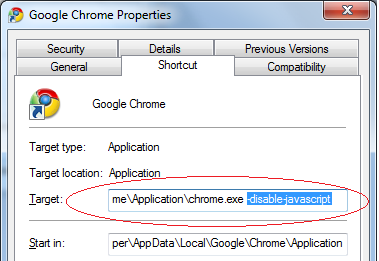
Right click the Google Chrome icon in your desktop, then click Properties.2. Click Shortcut tab.
3. Add -disable-javascript parameter in the Target field.
4. Click the OK button.,
Turning JavaScript off in Apple OS X Chrome:
Go to this link and follow the steps shown to turn off JavaScript in Apple OS X
It's not necessary to turn off Javascript in your browser.
This "attack" is nothing more than running a desktop type app on your computer. It doesn't involve the browser at all.
So, DON'T PANIC! :-)
Also, don't execute (click on) any email attachments. That's how this is distributed, not via website.
(BTW, even though this is billed as "cross platform", any individual instance of it will be for a specific platform like Windows or Mac. That's because there's a bundled runtime that uses native code.)