Free Republic
Browse · Search
General/Chat
Topics · Post Article

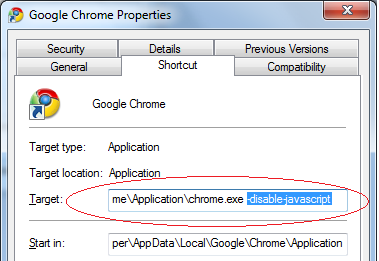
Turning JavaScript off in Windows Chrome:

Right click the Google Chrome icon in your desktop, then click Properties.

2. Click Shortcut tab.

3. Add -disable-javascript parameter in the Target field.

4. Click the OK button.,

Turning JavaScript off in Apple OS X Chrome:

Go to this link and follow the steps shown to turn off JavaScript in Apple OS X


8 posted on 01/04/2016 1:05:41 AM PST by Swordmaker (This tag line is a Microsoft insult free zone... but if the insults to Mac users continue....)
[ Post Reply | Private Reply | To 6 | View Replies ]


To: Swordmaker

You are telling everyone to browse without javascript?


10 posted on 01/04/2016 1:08:57 AM PST by Jeff Chandler (I shot Schroedinger's cat with Chekhov's gun.)
[ Post Reply | Private Reply | To 8 | View Replies ]

To: Swordmaker

bookmark


21 posted on 01/04/2016 3:27:42 AM PST by japaneseghost
[ Post Reply | Private Reply | To 8 | View Replies ]

Free Republic
Browse · Search
General/Chat
Topics · Post Article


FreeRepublic, LLC, PO BOX 9771, FRESNO, CA 93794
FreeRepublic.com is powered by software copyright 2000-2008 John Robinson