Skip to comments.
Why you absolutely need a mini PC
PC World ^
| Jul 7, 2025
| Florian Kastner and Sam Singleton
Posted on 09/18/2025 6:28:11 PM PDT by fireman15
Mini-PCs are space-saving, quiet, versatile and often cheaper than a classic desktop PC. We discuss the advantages and what you should look out for when buying in this guide.
Mini-PCs have been experiencing a real boom in recent years. No wonder, because these small desktop computers are powerful, space-saving, and flexible. This guide shows what a mini-PC actually is, where its strengths lie, and who can benefit the most from buying one.
Also, be sure to check out the PCWorld deals page where we highlight the best deals from around the web on mini-PCs, like the latest stellar deal on a GMKtec M3 Plus mini-PC, and more. In fact, mini-PCs are constantly going on sale for staggeringly low prices, so keep your eyes peeled while shopping and keep checking back with us to see the latest and greatest deals. (If you’re reading this article the day it goes live, we’re also tracking the best Amazon Prime Day mini PC deals.)
What is a mini PC? A mini-PC is a fully-fledged computer in a small format. In contrast to laptops, mini-PCs do without a battery and screen, which saves weight on the one hand and makes the small housing possible on the other—many models have a volume of less than one liter. At the same time, flexibility remains high: a monitor, mouse, keyboard, or external drives can be freely selected and easily replaced if necessary. If you like it neat and tidy, mount the mini-PC behind the monitor to save space or integrate it discreetly on the desk.
Despite their compact design, modern mini-PCs offer enough power for everyday tasks such as office work, surfing, streaming and even gaming. If you know your way around, you can even build your own mini PC with the right components.
(Excerpt) Read more at pcworld.com ...
TOPICS: Business/Economy; Chit/Chat; Computers/Internet; TV/Movies
KEYWORDS: desktop; floriankastner; followup; linux; minipc; samsingleton; windows; windowspinglist
Navigation: use the links below to view more comments.
first previous 1-20 ... 41-60, 61-80, 81-100, 101-116 next last
To: alexander_busek
I have a 32” 4k screen that I currently use with an old Dell laptop. I have to have it in a big docking station to drive the screen. It is on Win 10, will not run Win11.
So I’ve getting a nice Mac Mini, the Apple Mac ecosystem equivalent of the mini PC. And will be using it with that screen.
32” laptops are pretty rare.
81
posted on
09/19/2025 8:54:18 AM PDT
by
FreedomPoster
(Islam delenda est)
To: AppyPappy
My gaming machine gave up the ghost so I might need one. I would not have thought that these would make a good replacement for a gaming machine. But according to Grok, “The AMD Radeon 780M integrated graphics coprocessor (iGPU) in the Ryzen 9 8945HS (a Hawk Point refresh of the Ryzen 9 7940HS) delivers performance roughly equivalent to the NVIDIA GeForce GTX 1650 (laptop variant) or RTX 2050 (entry-level laptop variant) in gaming and synthetic benchmarks. This places it in the low-end discrete GPU tier, suitable for 1080p gaming at medium-low settings in modern titles (often 30–60 FPS with tweaks like AMD FSR upscaling).
So this $600 GMKtec Gaming PC, K11 AMD Ryzen 9 8945HS:
https://www.amazon.com/GMKtec-gaming-pc-desktop-ryzen-9/dp/B0DPGDSM92/
might be good enough for you.
I bought the following mini-PC last night for $338.99 after I found it during a discussion of what might work OK for Microsoft Flight Simulator.
https://www.amazon.com/dp/B0FC292HNC
It will be here on Sunday... I am anxious to see how it performs. The other two recent acquisitions have been used mostly in homelab duty, but they are pretty amazing considering one cost $129 on sale and the other was either $139 or $149. This latest one will be used when I am sitting in my tiny office in the back of my Ford Explorer waiting for my wife when she is doing volunteer work.
To: fireman15
Since 2000, I have built all my computers. The lone exception is my current laptop .
83
posted on
09/19/2025 9:52:55 AM PDT
by
AppyPappy
(They don't call you a Nazi because they think you are one. They do it to justify violence. )
To: AppyPappy
I started with a “digital kit” in the 70s. Went on to home computers (Commodores, Atari, TI etc. in the early 1980s. When I switched to PCs I built everything that was not a laptop up for many years with the exception of used machines that were bargains or computers people gave to me that were broken.
But most of my computers have been laptops in the last 20 years... They are just so darned convenient. I bought a couple super slim desktops a few years ago to use as media servers. But now I have found that mini-PCs have a lot of advantages for what I am currently doing, partially because they are a lot easier to get into than most laptops.
To: dayglored
85
posted on
09/19/2025 11:47:02 AM PDT
by
GOPJ
(Charlie Kirk worried democrats would murder his children. <P><I><B><big><center></B>)
To: FLNittany
Watching a movie on a phone is like using one of those earphones you got in the 60’s with your transistor radio to listen to Beethoven.
86
posted on
09/19/2025 1:08:54 PM PDT
by
beef
(The pendulum will not swing back. It will snap back. Hard.)
To: fireman15
87
posted on
09/19/2025 1:11:18 PM PDT
by
beef
(The pendulum will not swing back. It will snap back. Hard.)
To: beef
Very cool!!!
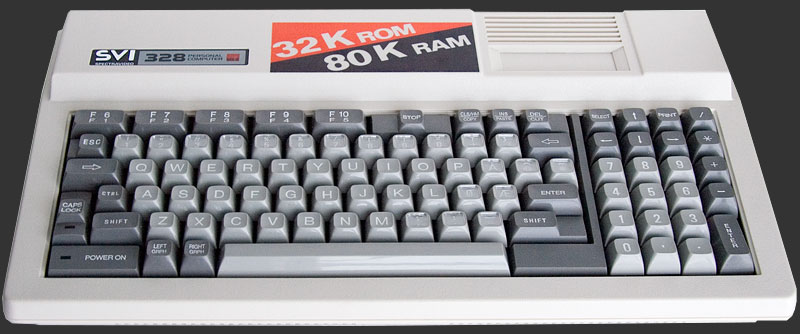
My favorite early computers were the TI994A and later the Commodore 64. But of course, these were both mainstream consumer products built as much for entertainment as actual usefulness.
On of my favorites that I still have around is a Sprectravideo SVI-328 MKII. It ran MSX Basic and was the model that Microsoft used as a template for its failed venture into standardized MSX home computers.
To: beef
Watching a movie on a phone is like using one of those earphones you got in the 60’s with your transistor radio to listen to Beethoven. This is certainly not the case if your phone is capable of using AR Glasses. The following have great sound and an amazing picture.
https://www.amazon.com/RayNeo-Air-Pro-Glasses-SteamDeck/dp/B0FJRXSNWK
AR glasses are frequently heavily discounted, and they only work with certain phones. I use a 5-year-old Samsung S20+ 5G that I purchased for $150 on Ebay.

To: fireman15
I can see myself wearing these, sitting in my easy chair, eating popcorn, and reacting to something that for the rest of the world isn’t there. Nah, I’ll stick with my OLED TV, thanks.
90
posted on
09/19/2025 2:19:29 PM PDT
by
beef
(The pendulum will not swing back. It will snap back. Hard.)
To: Mean Daddy
Sounds like fun times, lol.
91
posted on
09/19/2025 2:22:41 PM PDT
by
telescope115
(Ad Astra, Ad Deum…)
To: fireman15
I have a Herobox and an Iproda ..
92
posted on
09/19/2025 3:38:35 PM PDT
by
ßuddaßudd
((>> ☼ << "What the hell kind of country is this if I can only hate a man if he's white?")
To: fireman15
The other advantage is that they tend to use very little power especially at idle. So, when the one that I am using right now which is serving a website in the background with the monitor off... it is using less than 5 watts.
5 W is maybe $6 a year. 20x higher for a laptop is still negligible, esp as that number is 24/7, 365 days. Mini-PCs definitely have use, but it's pretty niche and most general populace would likely be better off with the mobility of a proper laptop.
To: anton
"doing carpentry in a car"
Someone needs to do an A.I. scene doing that, lmao...
94
posted on
09/19/2025 4:45:39 PM PDT
by
Bikkuri
(We are all Charlie now. I am Charlie!)
To: FreedomPoster
I really want a Magic Keyboard.. but they are so darn expensive :^/
95
posted on
09/19/2025 4:48:07 PM PDT
by
Bikkuri
(We are all Charlie now. I am Charlie!)
To: Organic Panic
"CNC"
Great game series ;^)

96
posted on
09/19/2025 4:54:04 PM PDT
by
Bikkuri
(We are all Charlie now. I am Charlie!)
To: fireman15
I’m still using a full tower that I update every couple of years. I have the last 5 hard drives still running internally. The next time my wife’s machine dies, I’m getting her a mini.
97
posted on
09/19/2025 4:59:59 PM PDT
by
Poser
(Cogito ergo Spam - I think, therefore I ham)
To: beef
Nah, I'll stick with my OLED TV, thanks. I typically use AR glasses when I am sitting alone in the back of my Ford Explorer waiting for my wife. They make the time go by very quickly and the experience is quite amazing.
I also like to use them with my DJI drone controllers. I am able to glance down at the buttons and controls when needed, but the visibility that I get with the glasses compared to the display on the controller is incredible. When you are coming in for a landing you can easily pull them down a bit and watch the drone directly. They are less disorienting than when using either drone Goggles or an AI headset such as one of the Meta Quests. Although they are quite amazing pieces of equipment as well with their own optimal uses.
To: ßuddaßudd
Those are interesting devices. How are they working out for you?
To: fireman15
I may get one for my relative. It looks like you need more usb ports so a usb hub will be needed plus external storage like a 2 bay computer drive external storage box.
Place all in a stack and it still is far smaller then a mid tower desktop pc.
100
posted on
09/19/2025 9:00:19 PM PDT
by
minnesota_bound
(Making money now. Still want much more.)
Navigation: use the links below to view more comments.
first previous 1-20 ... 41-60, 61-80, 81-100, 101-116 next last
Disclaimer:
Opinions posted on Free Republic are those of the individual
posters and do not necessarily represent the opinion of Free Republic or its
management. All materials posted herein are protected by copyright law and the
exemption for fair use of copyrighted works.
FreeRepublic.com is powered by software copyright 2000-2008 John Robinson