VISUAL EXAMPLE AT EBAY of what I want to buy— https://www.ebay.com/itm/600Mbps-Wireless-USB-WiFi-Network-Adapter-802-11AC-Dongle-802-11b-g-n-Antenna-st/402710458163?hash=item5dc369ef33%3Ag%3AjnsAAOSwMJNgNhvu&LH_BIN=1
Get a dual band unit, fastest you can afford.
70 Mbps is quite slow. Are you ever planning on upgrading your internet? Also, why do you want to use WiFi instead of just wired ethernet for your desktop?
These really old computers without wireless already?
I’m guessing but since you need a wifi adapter, I’m sensing your computers don’t have wifi built in, which means they are probably somewhat old....
The single best thing you can do to upgrade an older computer you want to keep it, is add memory to it, it’s probably really cheap and will add to performance...
On the wifi adapter, getting data back and forth from the internet faster won’t do you any good if your computer can’t keep up...
Go with the 300mb adapter, it’s probably cheaper and you won’t know the difference....
If you had a state of the art laptop or desktop machine for 2021, then the fastest adapter might be a better solution, but my philosophy is don’t spend good money on old equipment...
I just replaced my laptop, the old one was nearly 10 years old, it had built in wifi but the keyboard was starting to lose keys, the HDMI port went bad, etc...
I had replaced the keyboard with a USB keyboard for $20 and it worked fine for a couple of years.....
The eBay ones come complete with built-in firmware to report back to the CCP.
Faster usb means faster cross loading times to memory devices.
You may want the ones with the antenna for the desk top, signal strength is important when using wifi.
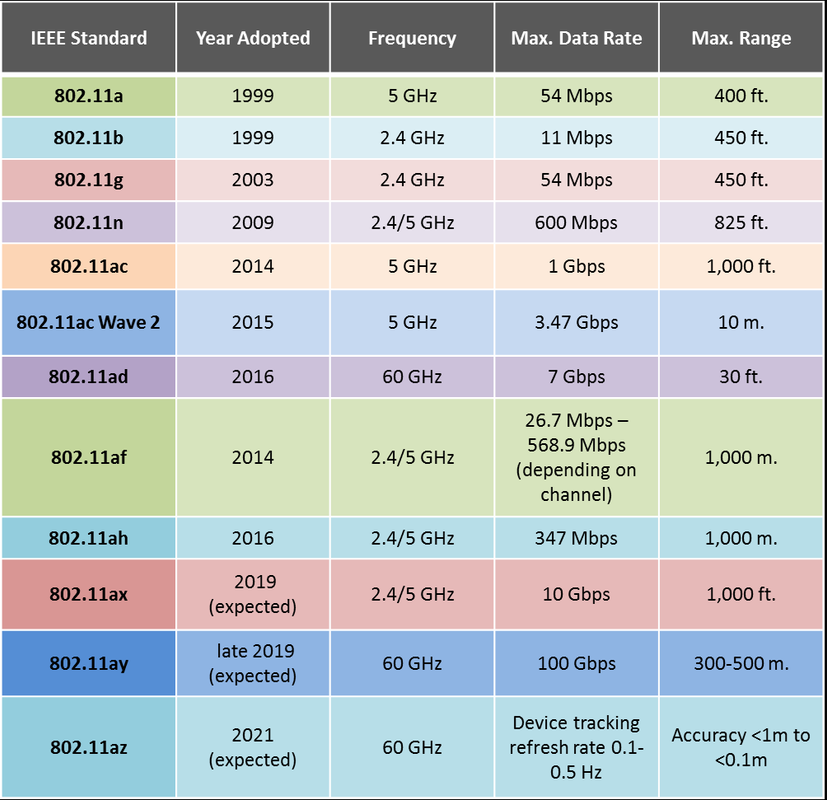
The advice that has been offered by a couple commenters already is good advice: You need to know what standard your current wife router is using, then buy the fastest USB adapter you can afford that matches that standard.
You also need to be aware of the generation of USB your PCs are using. If they’re using USB 1.0, you’re never going to get transfer speeds that reach your ISP speed because that generation of USB simply isn’t capable of it. If you’re on USB 2.0 or later, then this won’t be a problem as these generations are all more than capable of handling 70 mpbs of data throughput. If your machines are 12-years old or news, you’re almost certainly on 2.0 or latter.
If you’re using a Verizon router and it’s no more than a few years old, it’s probably a dual-band WIFE 5.0 N router. This is something Verizon can verify if you call them. If that’s the case - and you have USB 2.0 at least on your PCs - then get an adapter that is dual band, 5 GHz WIFI 5.0 Wireless-N.
Warp speed of course and remember to get an extra pair of dilithium crystals.
You can probably get a brand-new desktop with built in Wi-Fi (about two or three year old model), for a little more than the cost of Wi-Fi USB adapters
Get the fastest, cause you might not always be stuck on some undersped internet connection. If you get the low end, then next year Xfinity in your area stops sucking, or you switch to a better provider and suddenly you could be getting 900mbs except you got the slow one. Especially since it’s a USB you could be plugging into any computer for years to come.
“At most my speed from Xfinity is 70mbs via ethernet cable.”
Are you using CAT5e or CAT6 cabling? I would think you should get a better speed than that.
Because that 70 is you to internet.. not beween devices on your network
You have more then one device on you home network..correct?
Common is say a printer on wifi you print to.. or you file share between two PC’ or you want to add a NAS (Network Attached Storages)
Instead of the lectures about buying a new computer and Ethernet speeds, Has anyone bothered answered the poster’s question?
Here are some wifi and bluetooth adapters.
I have both for my desktop pc. Win10 probably has the driver, and for win7 you download from the makers website the driver.
https://www.amazon.com/Wireless-USB-WiFi-Adapter-PC/dp/B07V4R3QHW
D-Link has been working just fine for years on My Machines.
DuckDuckGo Search- Shopping: d-link usb wifi