“TMK no one could come up with means to remap the capslock key to copy.”
Because you are probably the only one in the world that uses it... The keyboard letter keys not working sounds like a glitch.
What I am finding is that some kernels and distros work better than others and on different machine hardware. And this is why I stick with Mint cinnamon, it has always driven the hardware correctly except for Mint 19 which had some issues with printers. Mint Devs spend more time and effort to make sure things work than other distros do.
And I don’t know about that distro, but Mint will let you swap out kernels with others. Sometimes an older kernel will work better with your particular hardware. I am using Mint 20.0 with kernel 5.4.0-26 And it has found and drives all my hardware and finds printers fine. Sometimes newer is not always better when it come to kernels. You sometimes have to find the right combination for your particular machine. But once you have it you never have to look back, it will be stable as a rock.
But you may have ended up with a bad download. This happens, I have had it happen many times and had to re-download again from a different mirror. I have had it happen because I was trying to do other stuff on the net while it was downloading it. So anymore I just start the download and walk away until it is done.
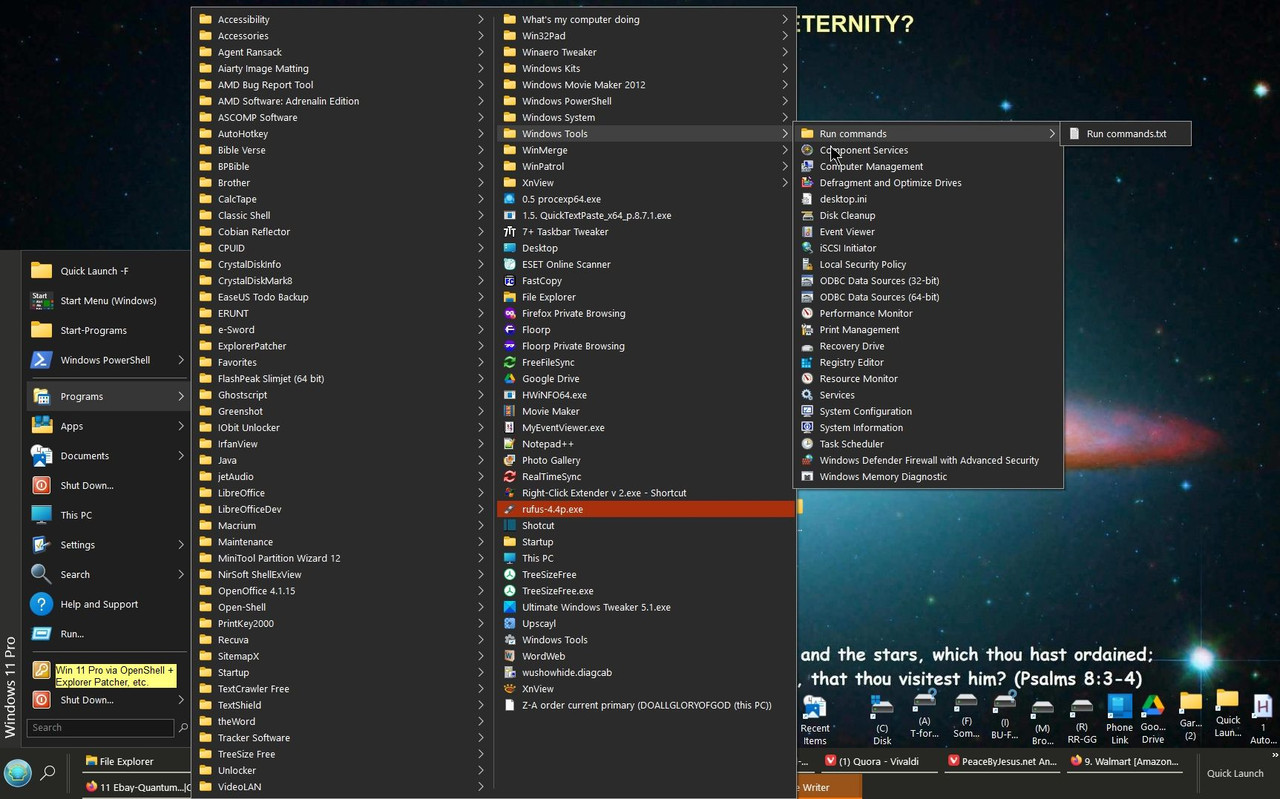
“Other thoughts: “Start” menu leaves things hard to find, even choosing “all...” Why should one even have to go there to find “restart, etc.?”
That menu system was designed back when windows XP and Windows 7 were the most popular OS. So it is set up to work just like Win 7/XP and it stuck. That is exactly how Windows 7 and XP menus worked. That is the Linux replacement for the “start” menu in 7 and XP. So it is retro in how it works. It works like windows did before Win vista and 10 screwed it up.
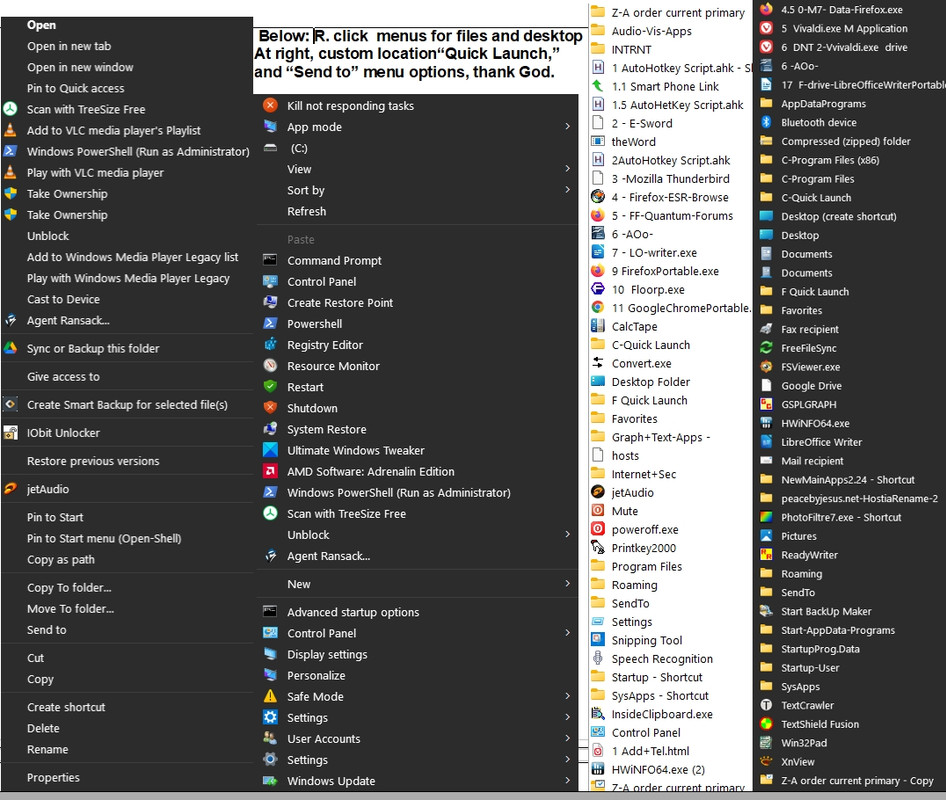
“Sparse right click menu, lacking “copy to” and “move to” among about 50 others functions, apps and locations that would make things faster.”
That is your particular distro. Mint has those options in the right click menu along with many more extra features most do not have. Now I don’t know about that distro. but in Mint you can right click your most used apps listings in the menu and send a launch icon onto your panel (tool tray) so they are handy all the time for you in your bottom panel.
“but to boot Linux I just keep tapping the F11 key, and choose Generic USB drive or something akin to that.”
Yes, if you leave windows as your primary internal OS you will have to use that boot menu to boot from any other drives. I have to do that too when I boot to something external. But... You know you can go set the boot order in your bios to go look for that external drive first to boot from first. If it “sees” it plugged in then it will just boot from that first automatically. If it is not present then it goes on to boot from the next option you have in the boot list. You will have to have that external plugging in when you set the bios boot order.
I am going to once again reiterate that you “should” have much better luck with Mint Cinnamon... I have tried about ten now and always end up going back because it is always stable and always works. If you had Cinnamon I have all the tips and tricks for you. It will even let you make GUI launchers for command line apps instead of having to use the terminal.
If you want the most customizable distro it is Mint Cinnamon. Because the Cinnamon is based on the Gnome desktop. Everything customizable about Gnome is built into Cinnamon. One thing to remember in all this is that it is not windows, so you cannot expect it to be windows... It is a whole new spouse you are going to have to learn to deal with if you divorce the old one. Sacrifices and compromises have to be made for the new spouse.
But I have never had letter keys not work and the support have no clue how to fix it. That would make me already worried about that Distro going forward... That means someone is not on top of stuff like they should be. Or like I say you ended up with a bad download and might have to try it again fresh. Could even be it lost something from the live CD to the drive when installing it to the drive. It happens. It can happen with any software download or install as you know.
I know one thing. I wish they would move away from .iso files and installs. It is an obsolete protocol. It is much easier to just copy an OS image file over to a drive formatted as bootable and go... No “install” step even needed. Then we would not have to worry about unplugging other drives to be safe. We would absolutely know it is copied to the correct target drive without any accidents.
Meaning few who complain about hitting the capslock key do not seek solutions, but which has plenty of answers on how to do that. Not sure if they do so as to ctrl+c, which autohotkey makes easy. I will search more for proven solutions for Linux.
Honestly, having to right click, choose copy and then chose paste (for which I remap Esc or F1 or F2) is far, far slower than just hitting two keys. I also use QuickTextPaste for common fill ins. On my old PC (not used by me) which runs Mint I did remap ScrolpLock to sleep, though I forget how to I did it.
The keyboard letter keys not working sounds like a glitch.
Yes, a major one!
But you may have ended up with a bad download.
Yet the live version worked IIRC.
That is your particular distro. Mint has those options in the right click menu along with many more extra features most do not have. Now I don’t know about that distro. but in Mint you can right click your most used apps listings in the menu and send a launch icon onto your panel (tool tray) so they are handy all the time for you in your bottom panel.
But one should be able to add to right click as well as Open With/SendTo menus, besides a Custom Start menu/Quick Launch (the latter requires Explorer Patcher for Windows to revert to W/10 shell).
That menu system was designed back when windows XP and Windows 7 were the most popular OS... It works like windows did before Win vista and 10 screwed it up.
Nothing wrong with mimicking if better, but since Win 8 and 10 were inferior, Linux should copy what the widely used OpenShell enables.
. You know you can go set the boot order in your bios to go look for that external drive first to boot from first.
Yes, but this works well as it is. No booloaders to configure or mess up. Thank God for all the good options in life.
If you want the most customizable distro it is Mint Cinnamon.
I had installed that before, and Mint 19.3 is what is installed on my old quite capable home-built (just used for the Internet), but found it lacking in desired customization, and as I read of KDE being lauded for this aspect, then I chose it. Maybe I will try to ask about this on one of their forums.
I am going to once again reiterate that you “should” have much better luck with Mint Cinnamon..
Tried to download it from the main site, but which only provided a 28 kb torrent file, by which I suppose the whole file will download perhaps, but I do not like that. Another source provided a 2.77GB file. Seems rather small to me, but I am using Rufus make a bootable USB of it.
Maybe try it next week, by the grace of God.
I don’t know much about kernels thing, but I tried once to revert to an earlier kernel, and wow, did it hose my linux install- I had to do a timeshift revert to get back my system, which thankfully I was uncharacteristically “smart enough” to do a snapshot before trying out the kernel th8ng. I have since built a computer and have dedicated a 1 tb drive to just timeshift backups, and macrium reflect backups for my 2 windows installs on a seperwte drive, and I also duplicate the backups to anothe r 2 tb external ssd. With the new NVME drives, it takes only 2 1/2 minutes to do a timeshift backup of linux. Thr macrium reflect for windows takes a bit longer, but nowhere near as long as it used to with ssd, or with hdd especially. 8m ,owing the speed of the NVME’s