Thanks for referring to under "Options" on the bottom of Layout where you find remap to ctrl option, however, you did not find the option to remap to ctrl+c, which is the issue, and retain that past sessions. That "really cool" (showing our age) option is what is missing.
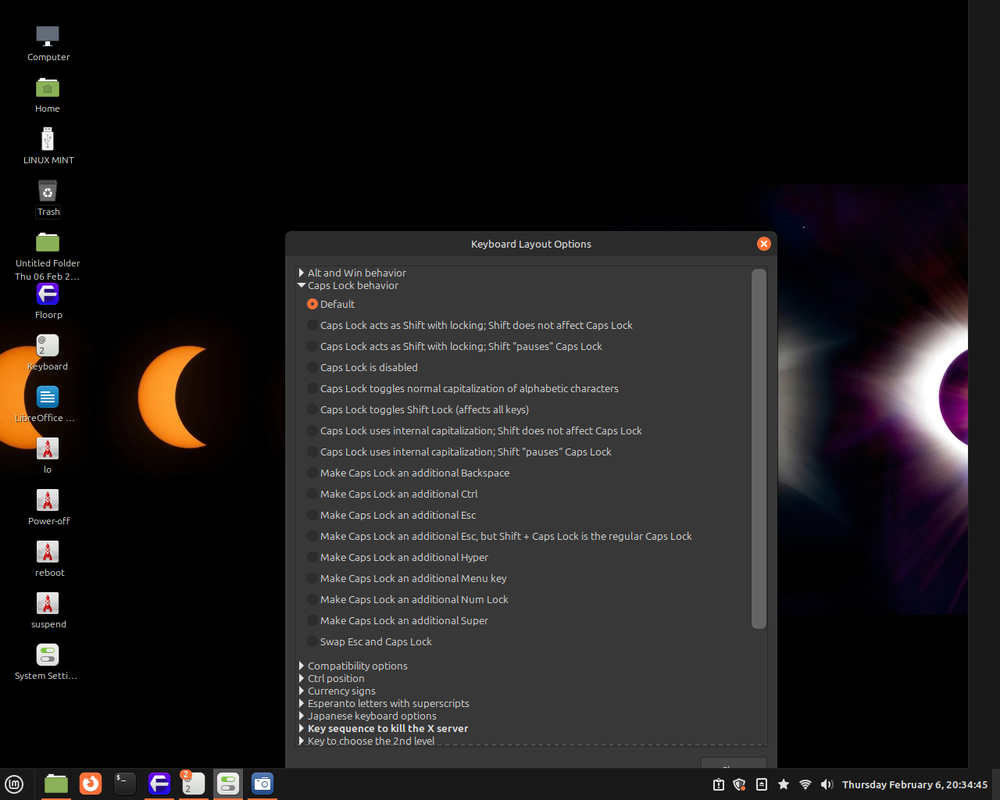
Ace’s was in a different location than mine. His was >Input devices->keyboard->Advanced tab->Configure Keyboard options. But they are there somewhere, just have to dig around.
Cannot find it myself, while eve he found it would not persist past sessions.
I think we are asking the wrong search question. “Control position” are probably the correct keywords for these options. That is where mine was. Did you get Mint “Cinnamon”? This is why I suggested it, so that I can help find stuff for you on my end.
Yes, Mint 22.1, as said. “Control position” is not ctrl+c. Failing that, maybe remap F1 to ctrl+c, and F2 to ctrl+v. In Windows, I remapped F1 to ctrl+F, since Firefox etc. somehow thinks that people show not want to see the Find bar open for every tab - as if no one would be searching for the same thing on many pages (some browsers even delete your last search term when searching again, as well as not providing a separate search bar).
you hit the “win” key (Super) it will open and close your menu and it can be navigated with the arrow keys. Up, down, left, right as a selector instead of needing your mouse.
Thanks, and Windows offers the like, but that is not what I need.