Posted on 02/25/2026 6:24:59 PM PST by hole_n_one
I was hoping that this would resolve itself but it has not…..
Yesterday, a post was put up on FR and I wanted to see more than just the provided excerpt, so I clicked on the source link.
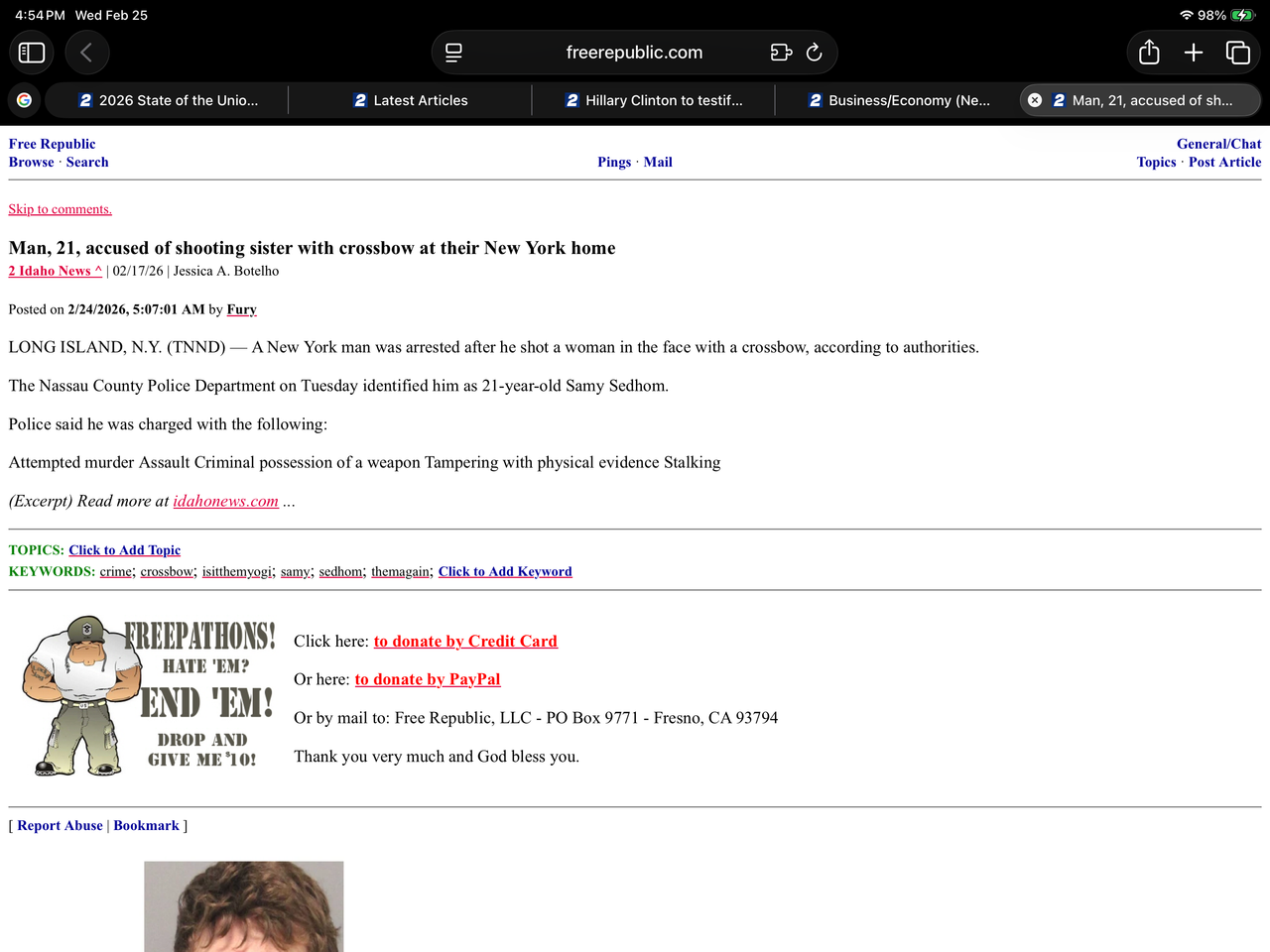
Ever since I did that, every tab that gets opened on my iPad (Safari browser) to an FR forum or page/post, the new tab has the number 2 in white with a blue background preceding the FR forum name or article title.
The number font and coloring is identical to the news station’s (2 Idaho News) logo that was used as the source link.
Here is a pic of what I am encountering…..
No luck.
I still need to work in a shower and hitting it….(maybe later tonight)
Anybody have any thoughts as to what is going on?
Note: The only page/forum on FR that this does not occur is the homepage, where the standard white star with a blue/red background is present.
This only happens on FR content. Other sites appear as expected.
Are you logged in?
(Sorry, but someone had to ask.)
Is there another browser you can use for troubleshooting purposes?
If it doesn’t occur on the other browser, Safari is probably corrupt. Not sure you can uninstall Safari, but if you can try uninstalling and reinstalling it.
I’m gonna try Chrome right now on my iPad…
brb
You need to be testing browsers on whatever device the problem is occurring on. I suspect you are running iOS on an Apple.
I think I will hold off on uninstalling.
It’s not that big a deal. (If it’s not that big a deal, why did you put up a post and waste everybody’s time?)
Thanks for your suggestion.
Everything looks good with Chrome browser on iPad.
Thanks!
Go into your internet settings and delete the cookies for FR.
Hard reset.
Try it then.
I’d be disappointed if not.
No. Try a different browser.
Afraid it caromed OB. Re-tee, you’re hittin’ three.
If there is a way to delete specific cookies to a particular website using this Apple IOS, I do not know how to go about doing it.
After doing the above, I did have to log in again to FR but the issue was not resolved.
Start with “Clearing Safari Data” and work down.
Lots easier than it looks on paper...
.
I’m going to just carry on as is as long as things don’t get any worse.
Thanks again!
I saw one suggestion - try deleting and re-adding the FR bookmark(s) in Safari.
I’ll give that a go….
Tuning in to see what the resolution will be for this. I hate when gremlins like this pop up out of nowhere.

Disclaimer: Opinions posted on Free Republic are those of the individual posters and do not necessarily represent the opinion of Free Republic or its management. All materials posted herein are protected by copyright law and the exemption for fair use of copyrighted works.